Procreate Artists: Make Your First Game on iPad with hyperPad

If you're a Procreate artist, you already know how to create beautiful digital art on your iPad. But what if you could take your creativity one step further and turn your artwork into a game? With no-code tools like hyperPad, you don't need any coding experience to bring your illustrations to life in an interactive game.
This post is here to inspire you to step into iPad game dev. You'll combine your custom digital art with simple, intuitive tools to create a game that's uniquely yours.
Why Procreate Artists Should Consider Game Development
As an artist, you already have the skills to build immersive worlds, design characters, and craft beautiful landscapes. Game development is the natural next step if you want your audience to interact with your work. And players notice great art in mobile games.
With iPad dev tools like hyperPad, you can:
- Create Custom Characters: Turn your hand-drawn characters into playable game avatars.
- Build Immersive Worlds: Use your backgrounds and settings as game levels.
- Design Unique User Interfaces: Craft menus, buttons, and other in-game elements that match your artistic style.
From Digital Artist to Game Developer: The Power of No-Code Game Dev
With no code game dev platforms like hyperPad, you can start making games without learning complex programming languages. hyperPad is designed to be user-friendly. You focus on what you do best (creating great visuals) while Behaviors handle the game mechanics.
Here's how easy it is to get started:
- Design Your Art in Procreate: Use Procreate to draw your game assets: characters, backgrounds, and objects.
- Import Art into hyperPad: Export your custom digital art from Procreate and import it into hyperPad.
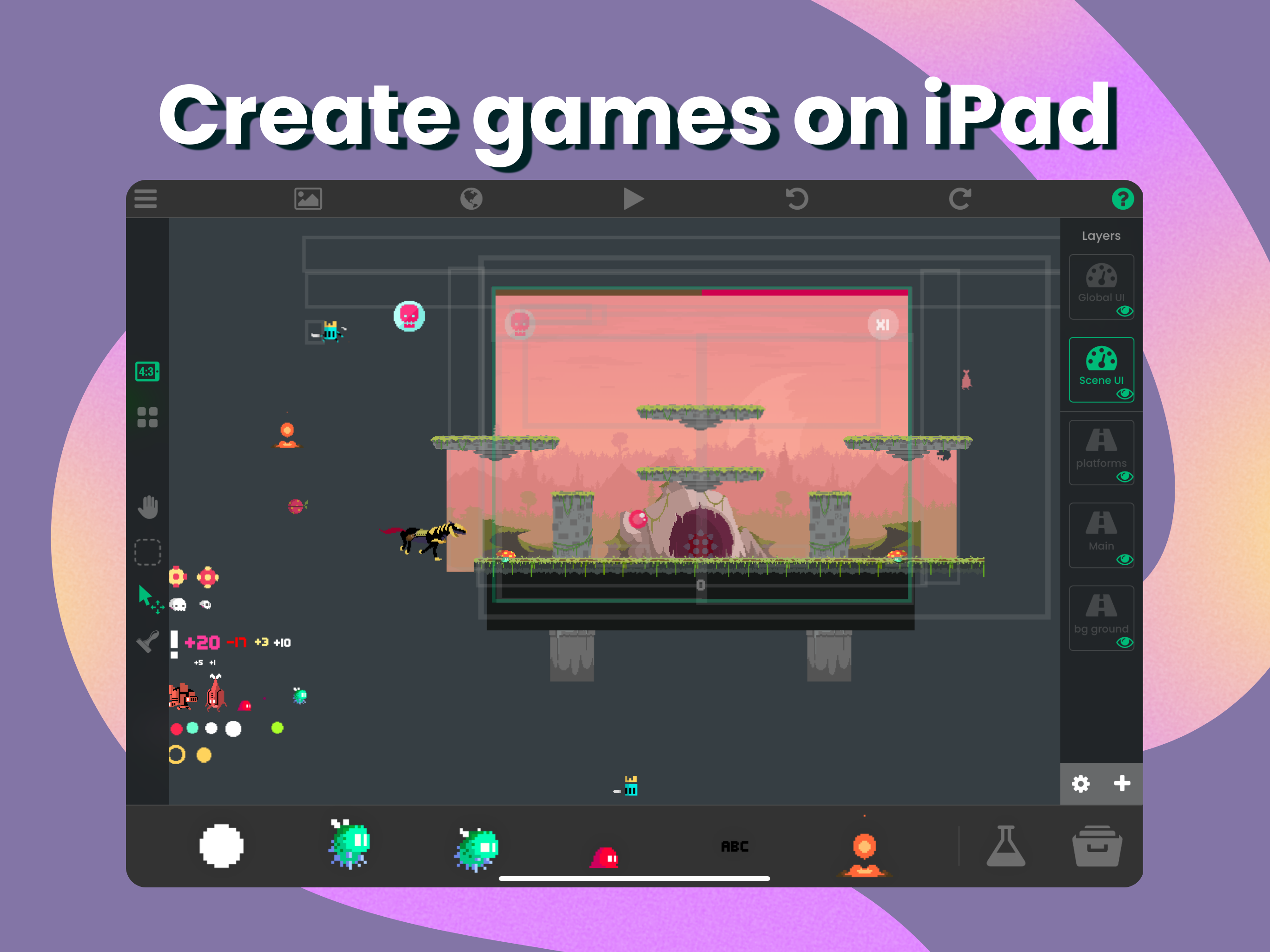
- Build Game Mechanics: Use hyperPad's drag-and-drop Behaviors to add simple gameplay mechanics like jumping, collecting items, or solving puzzles.
- Test Your Game: Play through your game as you build it, and make sure everything looks and works the way you want.
Examples: How Procreate Artists Can Move into Game Development
Procreate artists are well placed to make the leap from static digital art to interactive games. Here are two examples of what that could look like:
- An environmental artist who paints nature-inspired landscapes in Procreate could bring them to life as an eco-friendly puzzle game in hyperPad. Players might restore forests by solving puzzles, with the artwork front and center.
- A character designer known for whimsical characters could build a cute platformer where players guide those hand-drawn characters through vibrant fantasy worlds. With hyperPad, they could make it without any coding knowledge and share it with their Instagram followers.
Examples like these show that with the right tools, Procreate artists can step into game creation.
Why hyperPad Is a Good Fit for Procreate Artists
hyperPad makes game development accessible, so you can keep your focus on design and creativity. Here's why hyperPad stands out for Procreate users:
- Easy Art Import: Export PNGs from Procreate and bring them straight into your hyperPad project. Characters, backgrounds, and animation frames all come in the same way.
- No Coding Needed: hyperPad's drag-and-drop Behaviors let you build complex games without writing a single line of code. Focus on what you love (your art) and let hyperPad handle the rest.
- Customizable Gameplay: Want to create a fast-paced action game, a relaxing puzzle, or a narrative-driven adventure? hyperPad lets you design gameplay that suits your art style and vision.
Getting Started: Your First No-Code Game
Ready to get started? Here's a simple guide to making your first game:
- Concept: Think about the kind of game that would complement your artistic style. Do you want to create a fantasy platformer? An interactive storybook? A relaxing puzzle game?
- Art Creation: Use Procreate to design your game's key elements. Draw your characters, backgrounds, and objects with the same care you'd bring to a commissioned piece.
- Game Design in hyperPad: Once your artwork is ready, import it into hyperPad. Connect Behaviors to build your game and set up mechanics like movement, scoring, or even level progression.
- Publish and Share: Once you've created and tested your game, publish it to the hyperPad Hub to share with friends, followers, and other creators. Upgrade from hyperPad Starter to hyperPad and you can also export it to the App Store.
Start Your Game Dev Journey Today!
As a Procreate artist, you already have the skills to create beautiful visuals. With hyperPad, you have the tools to turn those visuals into interactive games. Whether you're designing a peaceful holiday-themed game or an action-packed adventure, your art can become a game that others will love to play.
The process is easier than you think. Try hyperPad Starter free, make your first game today, and have it ready for the holidays!