Create Games on Your iPad with No Code

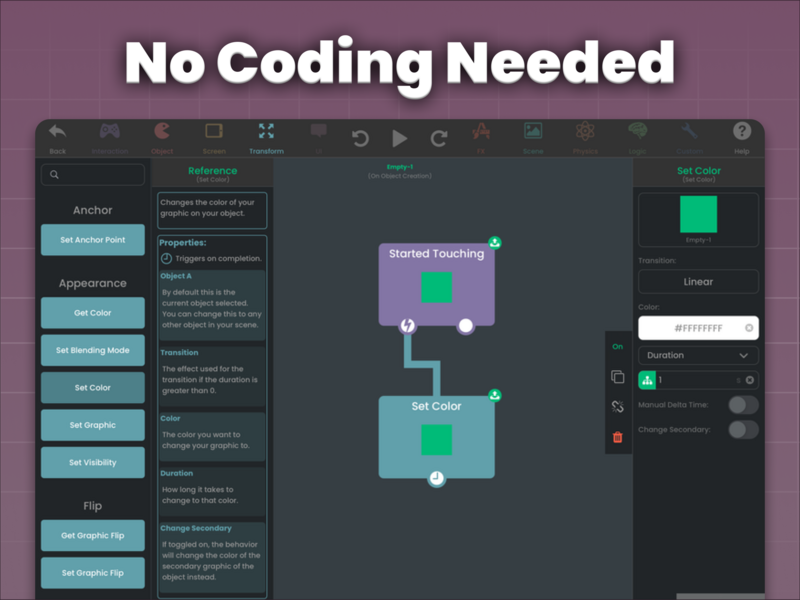
You don't need to be a seasoned programmer to bring your game ideas to life. hyperPad is a no-code game development app for iPad, so you can make games without writing a single line of code. Whether you're a beginner or an experienced developer, you build by dragging, dropping, and connecting Behaviors on screen. That keeps game creation fun and approachable.
Why Choose hyperPad for No-Code Game Development on iPad?
hyperPad is a good choice if you want to make games on your iPad without learning to code. Here's why:
1. No Coding Required
hyperPad lets you build games and interactive apps without any programming knowledge. You drag in Behaviors and connect them into a flowchart of your game's logic. That makes game development approachable for kids and adults, hobbyists and educators.
2. User-Friendly Interface
The hyperPad interface is designed to be straightforward, so you can focus on your ideas instead of technical details. With drag and drop, you design characters, environments, and gameplay mechanics directly on screen.
3. Create Anywhere, Anytime
With hyperPad, all you need is an iPad. Whether you're at home, in a park, or on a plane, your game is right there with you. You can work on it whenever inspiration strikes.
4. Built-In Asset Library
hyperPad comes with a library of assets, including characters, backgrounds, and sound effects, that you can use in your game. You can also import your own Graphics and sounds, so the look and feel is entirely up to you.
5. Learning and Teaching Tool
For educators, hyperPad is a hands-on way to teach programming concepts, game design, and problem-solving. Students get into game development without the intimidation of learning to code first.
6. Community Support
hyperPad has an active community of creators who share their projects, tips, and tricks. Whether you want inspiration or help with a specific feature, you can ask other creators.
How to Get Started with hyperPad
Getting started with hyperPad is simple:
- Download hyperPad from the App Store.
- Explore the tutorials. Step-by-step tutorials help you get familiar with the app.
- Start your project. Choose a template or start from scratch. Drag and drop to add characters, set up game logic, and design your levels.
- Test and share. When your game is ready, test it right on your iPad. Then publish it to the Hub for friends, family, and other players, or export it to the App Store.
Success Stories: What Can You Create with hyperPad?
Here are a few examples of what creators make with hyperPad:
- Educational games. Teachers have used hyperPad to create interactive lessons that make learning fun.
- Story-driven adventures. Storytellers have made games with rich narratives and engaging gameplay.
- Puzzle games. Behaviors make it easy to build the logic for challenging puzzle games.
- Arcade classics. Recreate your favorite retro games or design new ones with a modern twist.
Your iPad Game Dev Tool
hyperPad lets you create games on your iPad without coding. It's approachable for beginners and flexible enough for experienced developers. Whether you're a student, teacher, or hobbyist, you can turn your ideas into working games. Download hyperPad and start building!
Continue with a fair workflow test
Compare each option by building the same small mechanic. The free iPad game-making apps guide provides a broader decision framework, and the Behavior Interface Overview shows how hyperPad represents events and actions. Use each tool’s current official product page for plan and platform details.
Choose the workflow that fits the Project you want to finish. Test one representative mechanic before committing to a larger build, then judge the tool by how clearly you can create, test, and revise it.