Best Free Game Maker Apps for iPad


Reviewed October 2026. App availability and free-plan limits can change. Check each official product page before choosing a tool for a class or long-term project.
If you want to make a complete 2D game on iPad without writing code, start with hyperPad Starter. It gives you one editable Project and hyperPad’s visual creation tools for free. If the goal is early coding education, ScratchJr is a better fit for children ages 5–7. If you want to learn typed Swift code, choose Swift Playground.
These tools are free, but they are not interchangeable. One is a visual game engine, one is an introductory block-based learning app, and one teaches Apple’s Swift language.
Free iPad game-making options at a glance
| Tool | How you build | Best fit |
|---|---|---|
| hyperPad Starter | Visual Behaviors | Original 2D games |
| ScratchJr | Programming blocks | Ages 5–7 |
| Swift Playground | Swift code | Learning typed code |
1. hyperPad Starter: best for making a 2D game without code
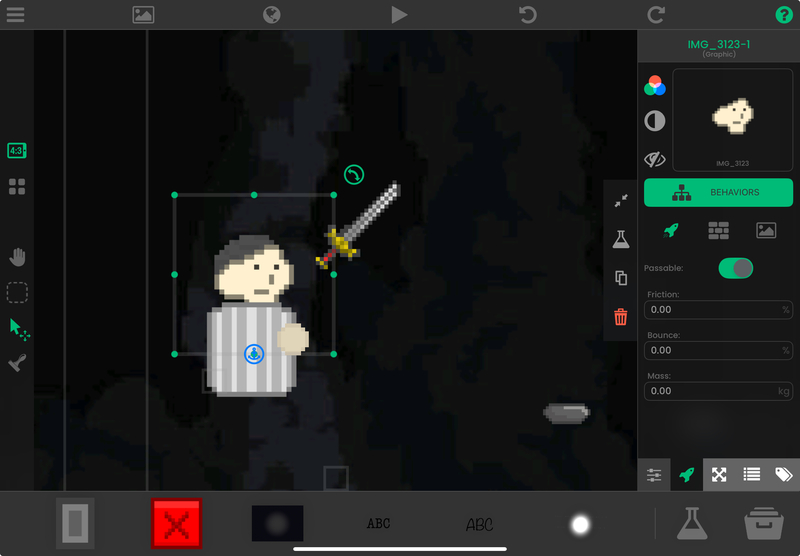
hyperPad Starter is a free visual game engine designed for iPad. You build with Scenes, Objects, Graphics, Attributes, and Behaviors instead of typing a programming language.
Starter includes one editable Project. That is enough to build and test a complete small game loop on the iPad.
What you can build
You can use visual Behaviors to:
- respond to taps, collisions, timers, and other events
- move Objects and control physics
- store values such as score, health, and speed
- create menus, labels, buttons, and other interface elements
- play animation, music, and sound effects
- change Scenes and manage game state
- test the game immediately on the same iPad
A first project could be a one-screen collectable game. Add a player and five coins. Connect touch input to movement. When the player collides with a coin, increase a score Attribute and remove the coin. Show a win message when the score reaches five.
The Behavior Interface Overview explains how the visual editor works. If you prefer a guided project, use the OrbitRun beginner tutorial.
What the free version does not include
Starter is for building and testing your first Project. The current App Store listing says you need to upgrade when you want to share the game or export it to Xcode.
App Store submission is a separate workflow. Building happens on iPad. A store release requires the appropriate hyperPad export, Apple’s developer requirements, and the final App Store submission process. Check the current product and Apple requirements before planning a release.
Choose hyperPad Starter if
- you want to make a playable 2D game directly on iPad
- you prefer visual logic to typed code
- you want to import your own art, animation, music, or sound
- you want to learn events, actions, conditions, values, and state through a game
- you want a free project with no subscription required to start
2. ScratchJr: best for young children learning programming ideas
ScratchJr is a free introductory programming app for iPad, Android tablets, and Chromebooks. Its official site says it is designed for children ages 5–7.
Children connect graphical blocks to make characters move, jump, dance, and sing. They can also create interactive stories and simple games.
Choose ScratchJr if
- the learner is in its intended age range
- the goal is sequencing, triggers, repetition, and creative storytelling
- a simplified block interface is more important than building a larger game
ScratchJr is not a general-purpose game engine. Its narrow scope is useful for early learning, but it is not the right comparison for someone planning a larger original 2D game or an independent App Store release.
3. Swift Playground: best for learning real Swift code
Swift Playground is Apple’s free coding app for iPad and Mac. It teaches Swift and SwiftUI through lessons, challenges, and app projects.
Unlike hyperPad Starter and ScratchJr, Swift Playground uses typed programming. Apple says app projects can access frameworks such as SpriteKit, and completed apps can be submitted through App Store Connect.
Choose Swift Playground if
- learning Swift is the main goal
- you want to work with typed code and Apple frameworks
- you are prepared to debug syntax and code structure
- you want a path toward building Apple-platform apps
Swift Playground can make games, but it is not a no-code game maker. Choose it because you want to program, not because you want the shortest visual route to a first playable mechanic.
Why Bloxels and Procreate are not in the free list
Bloxels and Procreate often appear in iPad game-making roundups, but they do not belong in a list of free game makers under the same definition.
- Bloxels: Its official support site says an account is required to build and share games, and personal accounts use paid monthly or annual plans. Games in the Bloxels Arcade are free to play, but that is different from free game creation.
- Procreate: It is an illustration and animation app, not a game engine. You can create game art in Procreate and import it into an engine, but Procreate does not turn the art into a playable game.
Making those distinctions prevents you from downloading an app that cannot complete the job you searched for.
How to choose the right free tool
Start with the outcome:
- Build a 2D game without code: use hyperPad Starter.
- Introduce a child ages 5–7 to programming blocks: use ScratchJr.
- Learn Swift and build with typed code: use Swift Playground.
Then test one small mechanic. Do not compare tools using a long wish list before you have built anything.
For a game, try to create one input, one rule, and one ending. For example: tap to move, collect five items, then show a win state. The tool that helps you understand and finish that loop is the best starting point for your goal.
Common questions
Can you make a game on iPad for free?
Yes. hyperPad Starter lets you build and test one editable Project with visual Behaviors. ScratchJr supports small interactive projects for young learners. Swift Playground supports game and app projects through Swift code.
Which free iPad game maker does not require coding?
hyperPad Starter uses visual Behaviors instead of a traditional programming language. ScratchJr also uses blocks, but it is designed for children ages 5–7 and has a more limited learning scope.
Can hyperPad Starter publish to the App Store?
No. Starter is for building and testing the first Project. The current App Store listing says upgrading is required for Xcode export. App Store submission also has separate Apple requirements.
Do I need a Mac to start making a game?
You do not need a Mac to build and test a Project in hyperPad Starter. A Mac becomes relevant later if you use the Xcode export and App Store submission workflow.
Build one playable mechanic
Choose the workflow that fits the Project you want to finish. Test one representative mechanic before committing to a larger build, then judge the tool by how clearly you can create, test, and revise it.