Best Alternatives to Scratch for iPad (2026 Guide)

If you want to make games on iPad, Scratch is usually one of the first tools you'll find. It's visual and easy for beginners to pick up.
Scratch was designed around desktop browsers, though. On iPad, many creators eventually hit limits with performance, publishing, controls, exporting, or project size. That's why more students, hobbyists, educators, and indie creators are looking for Scratch alternatives built for iPad.
This guide compares the best options in 2026 and shows which one fits:
- Beginners
- Game development
- Schools and classrooms
- Publishing real games
- Touch-first iPad workflows
- No-code creators
- Moving into advanced development
We'll also look at why making games on iPad has become far more practical over the past few years.
Why People Look for Alternatives to Scratch on iPad
Scratch is excellent for learning programming logic. It introduced millions of people to variables, events, loops, conditions, and sequencing.
Sooner or later, many iPad creators want more room to grow. These are the most common reasons they go looking:
1. Better Touchscreen Workflow
Scratch wasn't built as an iPad-first game engine.
Many creators want:
- Native touch controls
- Better drag-and-drop interfaces
- Editing designed for a tablet
- Faster scene editing
- More responsive project management
2. Real Game Publishing
Scratch projects mostly stay inside the Scratch community.
Eventually, creators want to:
- Export games
- Share apps outside one platform
- Publish projects online
- Build downloadable games
- Make portfolio-ready projects
3. More Advanced Game Features
As your skills grow, you'll probably want:
- Physics
- Better animations
- Layered scenes
- Complex game logic
- Multiplayer
- Custom UI
- Better audio handling
4. Offline or Portable Creation
Portability is one of the best reasons to build on iPad.
Many creators want to:
- Build games anywhere
- Work without a full PC setup
- Create while traveling or between classes
- Prototype quickly with touch
Today's iPads are fast enough to handle serious game creation.
What Makes a Good Scratch Alternative for iPad?
Some visual coding platforms feel great on a tablet. Others feel cramped.
The best iPad-friendly alternatives usually have:
Touch-Optimized Interface
Desktop-first tools often feel awkward on iPad.
Good iPad tools give you:
- Large touch targets
- Gesture-friendly editing
- Fast navigation
- Responsive scene controls
Visual Logic System
Scratch made block-based logic popular.
The best alternatives build on that idea with:
- Event systems
- Behaviors
- Visual scripting
- Node logic
- State systems
Real Game Development Features
Strong alternatives usually support:
- Physics
- Cameras
- Particle systems
- Audio management
- Scene transitions
- Save systems
- Animation tools
Export and Sharing Options
More and more, creators want:
- Web publishing
- App exporting
- Portfolio sharing
- Classroom collaboration
- Community publishing
Beginner Accessibility
The right platform should still feel approachable.
If the learning curve is too steep, many beginners give up before they finish anything.
Best Alternatives to Scratch for iPad
1. hyperPad
Best For
- iPad game development
- No-code game creation
- Publishing games
- Touch-first workflows
- Beginners who want to build complete games
hyperPad is a game maker designed around the iPad from the start.
Many alternatives are browser-based tools adapted for tablets. hyperPad was built for touchscreen game creation. That makes a big difference once you start editing.
Why hyperPad Stands Out
Native iPad Experience
hyperPad feels natural on iPad in a way desktop-first tools often don't.
In the editor you can:
- Drag and drop Objects into your Scene
- Edit with gestures
- Manage Scenes visually
- Use touch-friendly controls
- Prototype quickly
Visual Behaviors Instead of Code
Like Scratch, hyperPad uses visual logic.
Instead of typing code, you connect actions and events in the Behavior Editor to build a flowchart of your game's logic.
That lets beginners build:
- Platformers
- Puzzle games
- Physics games
- Rhythm games
- Adventure games
- Sandbox games
without learning a programming language first.
More Advanced Than Scratch
Many creators move to hyperPad after they outgrow Scratch.
Its main advantages include:
- A built-in physics engine
- Advanced animations
- Camera controls
- Layer management
- Scene organization
- UI tools
- Asset importing
- Multiplayer options
Designed for Real Game Creation
The biggest difference is purpose.
Scratch is mainly a learning tool. hyperPad is built for making and shipping games. You can Publish your project to the hyperPad Hub for other creators and players, or export it to the App Store with hyperPad (the paid version).
That makes it useful for:
- Student portfolios
- Indie prototypes
- Classroom game projects
- Game jams
- Mobile-first creators
Strong Fit for Schools
hyperPad combines visual logic with real game systems, so it works well in classrooms. Schools get 50% off through Apple School Manager, with Private Login for student accounts.
Students can learn:
- Logical thinking
- Game design
- Systems design
- Event-driven programming
- Interactive storytelling
without getting stuck on code syntax.
2. GDevelop
Best For
- Cross-platform development
- More advanced logic systems
- Desktop and web workflows
GDevelop is another popular no-code game engine.
It uses event-based logic, similar to other visual scripting systems.
Compared to Scratch, GDevelop offers:
- More advanced game systems
- Better export options
- Cross-platform publishing
- More features overall
The experience is generally stronger on desktop than on iPad, though.
Some creators do light editing on iPad, then move to desktop for larger projects.
Strengths
- Deep feature set
- Good community support
- Handles larger games
- Flexible logic systems
Weaknesses on iPad
- Less touch-optimized
- Desktop-style interface
- Can feel crowded on smaller screens
3. Hopscotch
Best For
- Younger creators
- Coding education
- Simple game experiments
Hopscotch has long been one of the more popular iPad coding apps for beginners.
It focuses on accessibility and learning.
The interface is approachable and easy for beginners to pick up.
Where It Fits
Hopscotch works well for:
- Kids learning coding basics
- Classroom exercises
- Simple animations
- Introductory projects
Limitations
Compared to newer game creation tools, Hopscotch can feel limited for bigger projects.
Creators who want:
- Advanced game systems
- Better physics
- More scene management
- More professional workflows
may eventually move to a platform like hyperPad or a desktop engine.
4. Construct
Best For
- Browser-based game development
- HTML5 games
- Intermediate creators
Construct is a well-known visual game engine.
It uses event-sheet logic instead of traditional programming.
Many creators like its:
- Fast prototyping
- Strong 2D workflows
- Browser-based editing
- Good export support
iPad Considerations
Construct can run in an iPad browser, but the workflow still feels built for desktop.
For long touch-based editing sessions, some creators prefer a native iPad tool.
5. Roblox Studio (Indirect Alternative)
Best For
- Multiplayer games
- Social game creation
- Older beginners moving into scripting
Roblox Studio itself isn't a full iPad development environment.
Many Scratch users still end up making Roblox games because:
- It has a massive player base
- Games can grow very large
- There are ways to earn money
- Multiplayer is built in
The tradeoff is complexity.
Roblox development eventually requires scripting in Lua.
That makes it harder for beginners than a fully visual system.
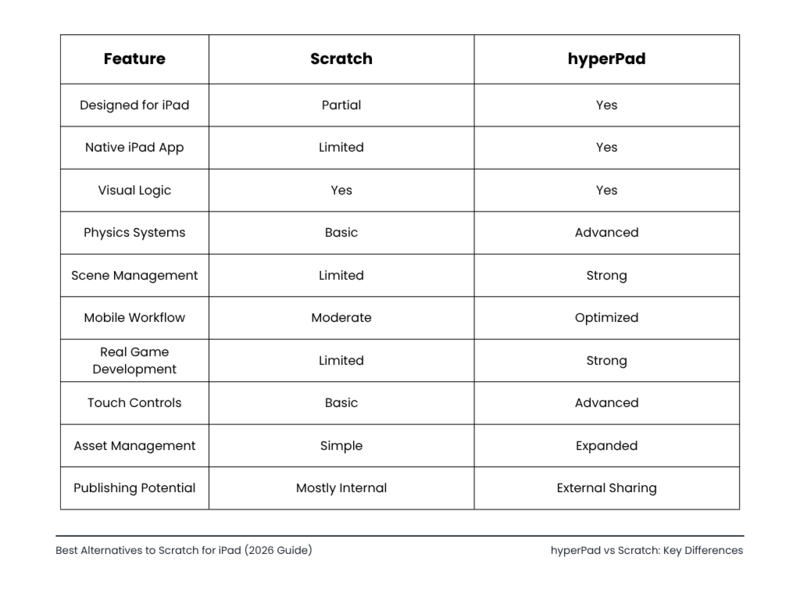
hyperPad vs Scratch: Key Differences
Is Scratch Still Good for Beginners?
Yes.
Scratch is still one of the best introductions to programming logic.
It teaches:
- Sequencing
- Events
- Variables
- Conditional logic
- Problem solving
For complete beginners, Scratch is still worth your time.
Many creators eventually reach a point where they want:
- Better visuals
- Larger projects
- More game mechanics
- Real publishing options
- Better iPad support
That's when an alternative starts to make sense.
Why iPad Game Development Is Growing
A few years ago, serious game development on iPad was considered difficult.
That has changed.
Today's iPads support:
- Fast processors
- External keyboards
- Apple Pencil
- Multitasking
- Cloud storage
- High-refresh displays
That makes the iPad a good home for mobile-first creators.
For students and beginners, building on iPad also lowers the barriers.
You don't need:
- Expensive desktop hardware
- Complicated software installs
- Traditional coding knowledge
You can start building games on a tablet.
That's one reason no-code game engines keep growing.
What Type of Creator Should Use Each Platform?
Choose Scratch If:
- You're learning programming basics
- You want very simple projects
- You're focused on education first
- You're completely new to interactive logic
Choose hyperPad If:
- You want to build real games on iPad
- You prefer no-code workflows
- You want touch-optimized editing
- You plan to make larger projects
- You want deeper game systems
Choose GDevelop If:
- You also use a desktop computer
- You want cross-platform workflows
- You're comfortable with more advanced systems
Choose Hopscotch If:
- You're very new to coding
- You're younger or in early education
- You want lightweight experiments
Choose Construct If:
- You like browser-based development
- You want HTML5 publishing
- You prefer event-sheet workflows
Frequently Asked Questions
What is the best alternative to Scratch for iPad?
If you want to make games on iPad specifically, hyperPad is a strong choice. It was designed around the touchscreen instead of adapting a desktop tool to a tablet.
Can you make real games on iPad?
Yes.
No-code engines and visual scripting tools now let you build fairly advanced 2D games right on your iPad.
Is hyperPad good for beginners?
Yes.
hyperPad uses visual Behaviors instead of typed code, so beginners can pick it up. It still supports advanced game systems as you grow.
What is better than Scratch for game development?
hyperPad, GDevelop, and Construct generally offer deeper game development tools, support for larger projects, and more ways to publish.
Do you need coding to make games on iPad?
No.
Several platforms let you build games with events, behaviors, and visual logic instead of a typed programming language.
Start Now
Scratch is one of the most important beginner programming platforms ever made. iPad game development has also come a long way.
Today you can go beyond simple learning projects and build much more capable games on a touchscreen. If you're looking for a Scratch alternative made for iPad, hyperPad gives you:
- Touch-first design
- Visual game logic
- No-code workflows
- Real game development systems
- Mobile-friendly creation
To try it, download hyperPad Starter. It's free and includes one project. When you want more projects and App Store export, upgrade to hyperPad for a one-time USD $14.99. You keep 100% of your revenue.
As iPad hardware keeps improving, the gap between building on a tablet and building on a desktop keeps shrinking. For many beginners, students, and indie creators, that shift has already happened.