Create Your Own Game Online: Tools, Tutorials and Sharing


You can create your own game online in two ways. The first is a browser-based game maker such as Scratch, Construct 3 or GDevelop's web editor, where you build inside a web page. The second is a game-making app, like hyperPad on iPad, where you build in the app and use the internet to learn, share your game and get feedback. Either way, the steps are the same: pick a tool that fits your skill level, follow one tutorial, start with a tiny game, and share it with players. This guide covers your options, free online resources, and indie games worth learning from.
Ways to create your own game online
| Option | Where you build | How you build | Where you share |
|---|---|---|---|
| Scratch | In a web browser | Drag-and-drop code blocks | The Scratch website |
| Construct 3 | In a web browser | Event sheets | Web, plus export options on paid plans |
| GDevelop | Browser or desktop app | Visual events | Web and other platforms, depending on plan |
| hyperPad | iPad app (also Apple silicon Macs) | Visual Behaviors | hyperPad Hub, plus App Store Export with the paid app |
| Unity or Unreal Engine | Desktop editor | Code or visual scripting | Many platforms |
Plans and features change, so check each tool's site before you start.
Beginner-friendly tools
If you're new to game development, choose a tool with a clear interface and drag-and-drop building. You'll make simple games without learning a programming language first.
hyperPad is an iPad app where you make games by connecting Behaviors instead of typing code. You connect actions and events to create a flowchart of your game's logic. hyperPad Starter is free and includes one Project, and you can Publish your game to the hyperPad Hub so players can try it online. Teachers use hyperPad to teach coding and game design from grade 4 through post-secondary.
Advanced tools
Experienced developers often use engines like Unity and Unreal Engine on a desktop computer. Unity was used to make well-known indie games such as Hollow Knight and Cuphead. Many creators prototype ideas in a faster visual tool first, then decide whether the project needs a bigger engine.
Learning resources and tutorials
Online resources can take you from your first jump to a finished game. Here's an easy game tutorial to get you started.
https://www.youtube.com/embed/Vch5qZZCo1g?si=6nBYFtF2vrr4WFqM
Course sites like Udemy and Coursera offer game development classes, many of them paid. Free options include the hyperPad YouTube channel and the hyperPad documentation, where every Behavior has its own page.
Start with a tiny game
Begin with small projects you can finish. Each one teaches you fundamentals, lets you try a new mechanic, and adds to your portfolio.
Celeste is a good example of starting small. It began as Celeste Classic, a short PICO-8 game its creators made in four days during a game jam. The full game came out years later and grew from that prototype.
Join online game development communities
Online communities give you feedback, ideas and people to learn from. Forums, Discord servers and subreddits like r/gamedev are places to ask questions and share progress.
Game jams are one of the best ways to practice. Events like Ludum Dare bring thousands of developers together to make a game over a weekend. Short deadlines push you to finish something small and complete.
Share your game online
Once your game works, put it in front of players. Sites like itch.io and Game Jolt let indie developers upload, share and sell games. If you build in hyperPad, Publish to the hyperPad Hub to get feedback from other creators. When you're ready to sell, the paid hyperPad app lets you Export to the App Store, and you keep 100% of your revenue.
Indie games to learn from
Undertale by Toby Fox
Undertale started as a small independent project funded through Kickstarter. Toby Fox built an original RPG with accessible tools, and it became hugely popular.
Stardew Valley by ConcernedApe
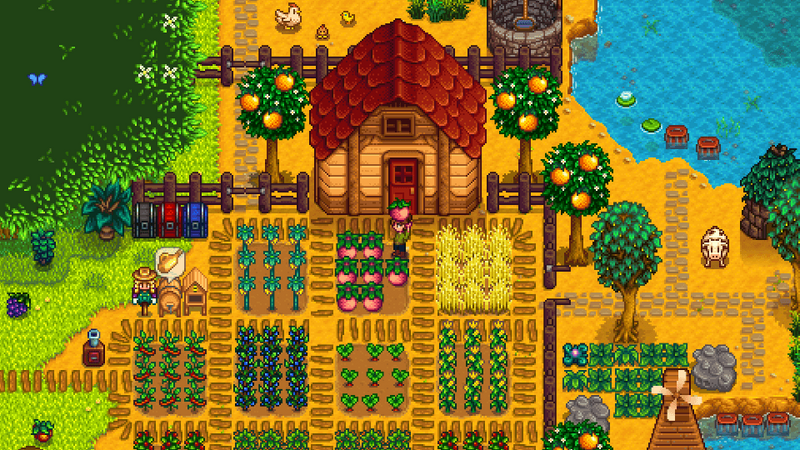
Stardew Valley was made by one developer, Eric Barone (ConcernedApe), using the XNA framework. It became a commercial and critical success.
Hollow Knight by Team Cherry

Hollow Knight was made by the small studio Team Cherry with the Unity engine. Players praised its art, challenge and world, and it still inspires indie developers.
A plan for your first week
- Pick one tiny game. One screen, one goal, one way to lose. A "catch the falling object" game is enough.
- Follow one tutorial to the end. The video above builds a complete small game. Finish it before you start your own idea.
- Change one thing. Swap the art, change the speed, or add a score. Changing a working game teaches you more than starting from nothing.
- Share it with one person. Publish it to the Hub or send it to a friend. Watch them play without explaining anything, and write down where they get stuck.
When you have a question, the hyperPad Discord is where creators share work in progress and help each other with Behaviors.