The Best Game Development Tools for iPad: Cost Breakdown & Why hyperPad Wins

Breaking Down the Costs of Publishing a Game as a Solo Developer on the Apple App Store
Getting a game onto the Apple App Store as a solo developer is exciting, and it costs money. Between development tools and licensing fees, you need to know what you'll spend before you start. This article breaks down the costs of three popular game development tools (Unity, Unreal Engine, and Buildbox) and explains why hyperPad is the best fit for game development on iPad.
1. Key Cost Factors
Before looking at specific tools, here are the main costs of developing and publishing a game:
- Development Tools & Licenses: Fees for game engines, software, and tools.
- Apple Developer Program: An annual $99 fee to publish on the App Store.
- Asset Costs: Paid art, music, and models.
- Marketing & Publishing: Ads, trailers, and app store optimization (ASO).
- Third-Party Services: Cloud services, analytics, and monetization platforms.
2. Cost Breakdown by Game Engine
Unity
- Development License: Free for personal use (<$200k revenue), Unity Pro ($2,040/year).
- Additional Costs: Asset Store purchases, optional cloud services.
- Monetization Fees: No revenue share on current plans. Unity dropped its planned runtime fee and revenue-share option in 2024.
- iPad Compatibility: Unity requires a PC or Mac for development. iPad is only supported for testing through Unity Remote.
Unreal Engine
- Development License: Free to use, with a 5% royalty on revenue above $1M.
- Additional Costs: Marketplace assets, optional premium support.
- Publishing Costs: The Apple Developer fee plus Epic Games' royalty.
- iPad Compatibility: Unreal Engine development requires a PC or Mac. There's no native iPad support.
Buildbox
- Development License: A free version is available, with major limitations.
- Paid Plans: $199/year (Basic) or $499/year (Pro) for full export capabilities.
- Additional Costs: Asset purchases, optional Buildbox asset marketplace.
- Monetization Fees: Revenue sharing applies to the Free and Basic tiers.
- iPad Compatibility: Limited functionality on iPad. Full game development requires a computer.
hyperPad: Built for iPad
- Development License: Start free with hyperPad Starter (one project). hyperPad is a one-time payment of USD $14.99 that adds more projects and App Store export. Upgrades and support are free.
- Capable Engine: hyperPad includes physics, particles, shaders, sockets, and HTTP, and games made with it have shipped to the App Store.
- Made for All Ages & Skill Levels: Beginners, students, hobbyists, and professional developers all build with hyperPad.
- Built for iPad: hyperPad is designed for touch-based game development, so you can make mobile games without a traditional computer.
- Additional Costs: Asset purchases, optional cloud storage.
- Publishing Costs: No royalties or revenue sharing, so you keep 100% of your revenue. You pay Apple's $99 developer fee, and you need a Mac with Xcode for the final App Store upload.
- iPad Compatibility: Fully functional on iPad. It's a game engine built for iPad from the start.
3. Total Cost Estimation
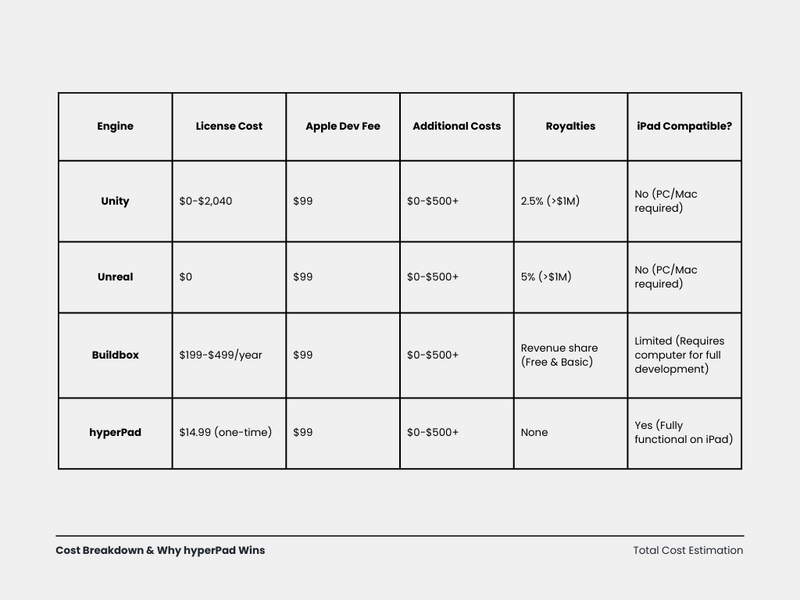
Which dev tool is best for you?
For a solo developer, hyperPad is the most accessible and affordable way to build a game on an iPad and take it to the App Store. Buildbox locks key features behind yearly subscriptions. hyperPad gives you a native, touch-friendly environment made for mobile games for a single one-time payment. You pay no subscription and no royalties, and the tools hold up for professional work. If you want to build and ship games quickly, at any skill level, that makes hyperPad the practical choice.
Unity, Unreal Engine, and Buildbox all need a traditional computer for full development. hyperPad runs natively on iPad. You can build, test, and Publish to the Hub, all from your iPad. For the App Store, you Export an Xcode project from hyperPad and use a Mac with Xcode for the final upload.
If you want a game development tool that's easy to use and still capable enough for professional work, hyperPad is a strong pick. Unreal and Unity are great for high-end 3D games, and Buildbox is a workable but expensive no-code option. For 2D games you build on an iPad, hyperPad fits best, and it lets creators of all ages turn their ideas into games.
Try hyperPad Starter free. When you want more projects and App Store export, upgrade to hyperPad for a one-time USD $14.99. You keep 100% of your revenue.