How to Create 2D Game Assets on iPad

If you want to create 2D game assets on iPad, start with the game mechanic rather than a long art list. Build a playable version in hyperPad with placeholder Graphics. Then create only the sprites, backgrounds, interface elements, animation, and audio that the mechanic needs.
This workflow keeps the artwork connected to the game. You can test every asset at its real size, inside the real Scene, before producing the rest of the set.
Tool links and availability reviewed October 8, 2026. Check each official product page for current compatibility, pricing, and requirements.
Choose a tool by the asset you need
| Asset | Useful iPad tool | Test inside hyperPad |
|---|---|---|
| Painted characters and backgrounds | Procreate | Scale, contrast, transparency, and collision area |
| Pixel sprites and frame animation | Pixaki | Frame alignment, playback speed, and readability |
| Icons and interface layouts | Affinity Designer 2 | Touch target size, hierarchy, and button states |
| Music and sound effects | GarageBand | Volume, repetition, timing, and feedback |
| Playable Scenes and logic | hyperPad | How every asset works with Objects, Behaviors, physics, and UI |
The broader iPad game-development tools guide explains how these apps fit into a complete workflow. This guide focuses on the asset pipeline itself.
Start with an asset list from the prototype
Build one short loop in hyperPad with placeholder Graphics. A collectable game might need:
- one player Graphic;
- one collectable;
- one obstacle;
- one background;
- one score label;
- an idle and movement animation;
- collect, damage, and completion sounds.
This is enough to reveal the required dimensions, animation states, interface space, and visual feedback. It also prevents you from finishing artwork that the final mechanic does not use.
Create one representative Graphic
Choose the asset that establishes the visual style or carries the most risk. For a platform game, that may be the player sprite. For a puzzle game, it may be a tile and its selected state.
Export the Graphic with a transparent background when the Scene must remain visible behind it. Keep the editable source file separate from the exported game file. Use names such as player_idle.png, player_jump.png, and coin_01.png so the Asset Library remains understandable later.
The Supported Asset Types reference lists the formats and specifications hyperPad currently accepts.
Import and test before making the full set
Follow the Importing Assets guide and place the first Graphic inside the running Scene.
Check it against the actual game:
- Can you recognize it at normal play size?
- Does it remain clear over the background?
- Is the transparent edge clean?
- Does the collision area match what the player sees?
- Does it leave enough space for UI and touch controls?
- Does it stay readable while moving?
Fix the source file now. A sizing or contrast problem becomes expensive when it is repeated across dozens of assets.
Build animation as a sequence of readable states
An animation needs consistent frame dimensions and alignment. A character that shifts a few pixels between frames can appear to shake even when its Object is standing still.
Name frames in playback order and test a short cycle first. The Importing and Using Animations guide covers individual frames and sprite sheets.
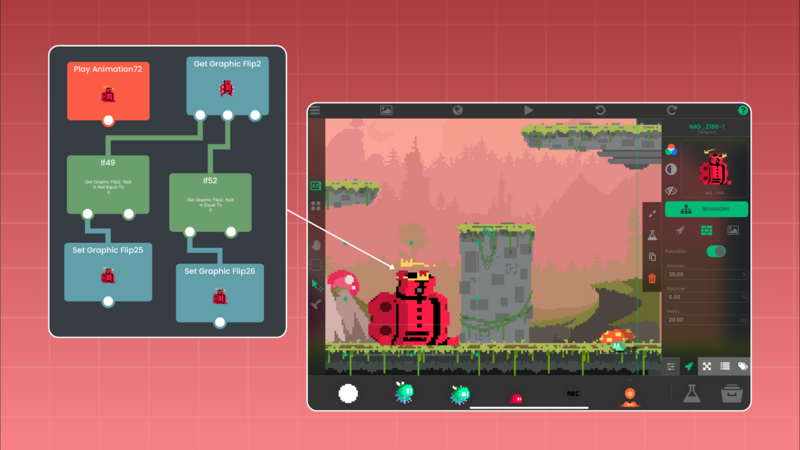
Inside hyperPad, use the Play Animation Behavior to connect the animation to a real event. Test the idle, movement, hit, or collect response in context instead of previewing it only in the art app.
Design interface assets for fingers
A button is not finished when it looks good in a design file. It must also communicate that it can be touched.
Create normal, selected, and disabled states when the interface needs them. Place the exported button in the Scene and test:
- whether its label is readable;
- whether the touch area feels generous;
- whether nearby buttons are easy to distinguish;
- whether the selected state is obvious;
- whether the layout works at the intended aspect ratio.
Use hyperPad UI Objects and Behaviors to test interaction before polishing every menu screen.
Add audio as gameplay feedback
Start with the sounds that tell the player what happened. A collect sound confirms success. A warning sound signals danger. A completion sound marks the end of the loop.
Import the files through the Asset Library, then connect them with Play Sound. Test effects with music playing and at an ordinary device volume. Short, repeated sounds should remain clear without becoming distracting.
Keep the Project organized
Use the Files app for source art, exports, audio, licenses, and store materials. Use the hyperPad Asset Library for the files that enter the Project.
A simple folder structure is enough:
- Art Source
- Exported Graphics
- Animation
- Audio
- Fonts
- Licenses
- Screenshots
Keep creator names, source URLs, license text, and required attribution with the Project records.
Finish one visual slice
A visual slice is one small part of the game with representative art, animation, audio, UI, and logic working together. Give it to someone who has not seen the Project. Watch where they misread an Object, miss a button, or fail to understand the feedback.
Use those observations to revise the asset system before expanding it. The goal is not to create the most files. It is to make every asset help the player understand and enjoy the game.