What Is FNF? How Friday Night Funkin' Works for Game Creators


FNF means Friday Night Funkin', a rhythm game where you match arrow prompts to the beat. The original began as a Ludum Dare 47 project and was released by its creators on Newgrounds and itch.io.
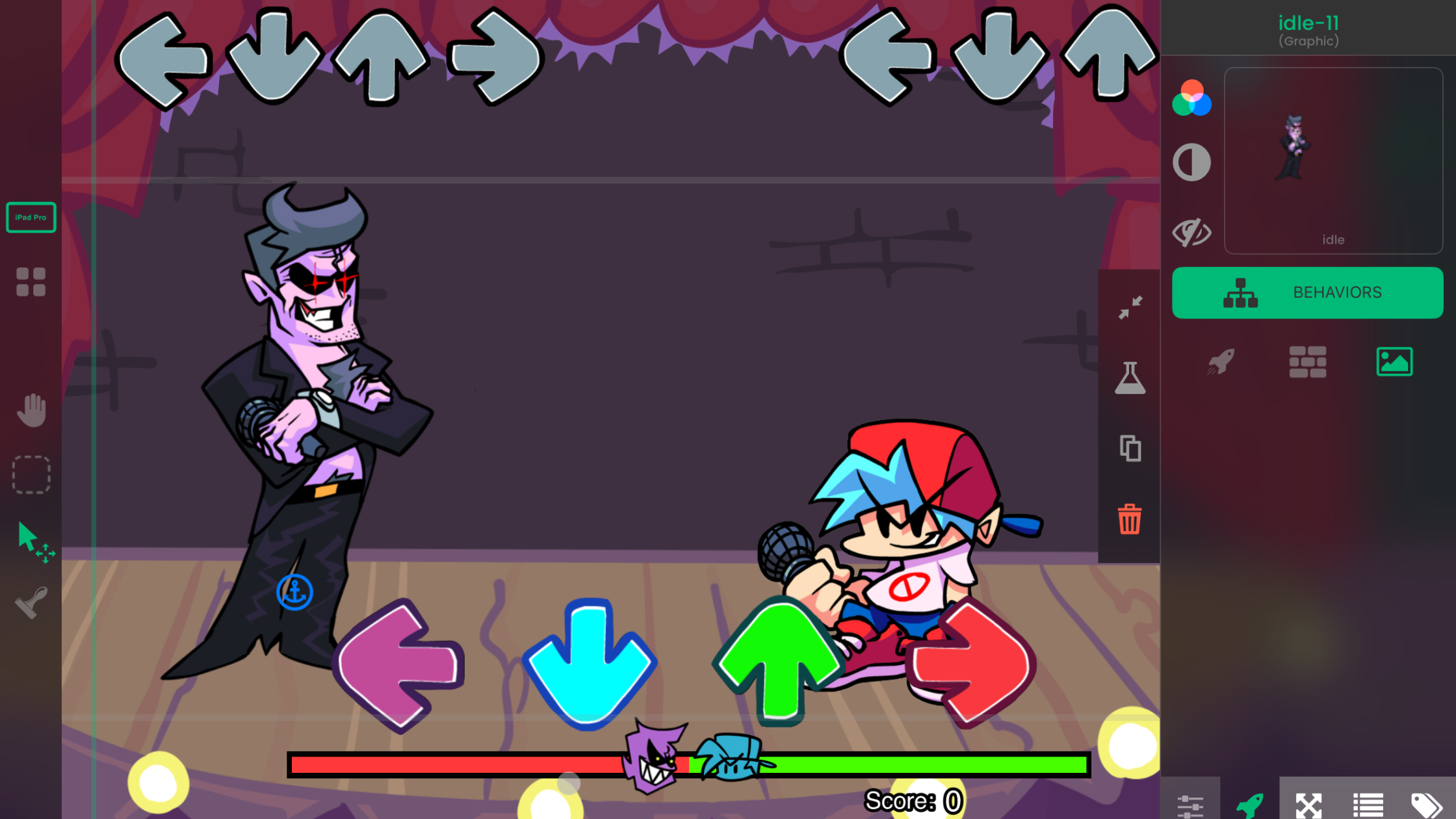
For game creators, the useful lesson is the rhythm loop: show a timed prompt, read the player's input, judge the timing, update the score, and move to the next note. You can prototype an original version of that loop on iPad with hyperPad's visual Behaviors. This does not modify the official FNF game or give permission to reuse its characters, music, or art.
What does FNF mean?
FNF is short for Friday Night Funkin'. In each song, notes move toward fixed targets. You press the matching direction when a note reaches its target. Accurate timing keeps the performance going; missed notes reduce your standing.
The official game can be played on Newgrounds and downloaded from the creator's itch.io page. Those are useful references when you want to study the original timing, feedback, and song structure.
Why the design works
An FNF-style rhythm game gives the player a clear job. The screen shows what to press and when to press it. Every input produces immediate visual, audio, or score feedback.
For a first prototype, you only need:
- four direction targets
- notes that move toward those targets
- touch controls
- a timing window
- a score and miss counter
- one short music loop
Build that version before adding characters, dialogue, menus, or several songs.
How to prototype the rhythm loop in hyperPad
1. Build one play Scene
Create a Scene for the song. Add four target Objects near one edge of the screen. Give each target a direction such as left, down, up, or right.
Add a UI layer for the score and miss count. Keeping the score in the UI prevents it from moving with gameplay Objects.
2. Create one reusable note Object
Start with a single note. Use movement Behaviors to send it toward the matching target at a steady speed. Duplicate the Object only after the first note travels correctly.
Use an Attribute such as direction to identify the note. Attributes let you store values on an Object and read them from Behaviors. See Object Attributes for the Set Attribute and Get Attribute workflow.
3. Read the player's input
Use Started Touching on four on-screen controls. Each control represents one direction. When the player taps, compare that input with the note nearest the target.
hyperPad connects events to actions visually. The touch event starts the logic. An If Behavior checks the note's direction and position. The next action awards points or records a miss.
4. Judge the timing
Create a small hit zone around each target. When a note enters that zone, it can be scored. A smaller zone produces stricter timing.
Use collision events or position checks to decide whether the input is early, accurate, or late. The Behavior documentation is a useful starting point for this part of the prototype.
5. Add feedback
On a successful input, remove the note, update the score, and briefly change the target's appearance. On a miss, update the miss counter and let the note leave the screen.
Immediate feedback helps you test whether the timing feels fair. It also makes problems easier to spot while playtesting.
6. Add music after the input loop works
Import a short audio file, then trigger it with the Play Music Behavior. Test a small set of notes against that loop. Full song charting takes time, so prove the timing system first.
Can hyperPad make an FNF mod?
hyperPad can build an original rhythm game inspired by the timing structure you study in FNF. It does not edit the official FNF source files. Use your own characters, music, Graphics, dialogue, and rules.
For a longer build plan, use the FNF-style rhythm game guide. It covers the wider project structure while this article explains the core design loop.
Make an original rhythm game
Use FNF to study rhythm-game structure, then create your own characters, music, art, dialogue, and rules. Do not copy or redistribute another creator's protected assets.
You could change the mechanic by asking players to tap colors, trace shapes, switch lanes, or match drum sounds. The useful lesson is the event loop, not a copy of the original presentation.
Start with one playable song loop
A small rhythm prototype teaches input, timing, Attributes, UI, audio, and game state in one project. Once the loop feels good, share the project on the hyperPad Hub and ask players whether the timing is clear.
Build one short timing loop, then test whether the notes, audio, and feedback stay in sync. Fix the point where the rhythm becomes unclear before adding another song or lane.