Make Your Own Wingspan-Style Game on iPad

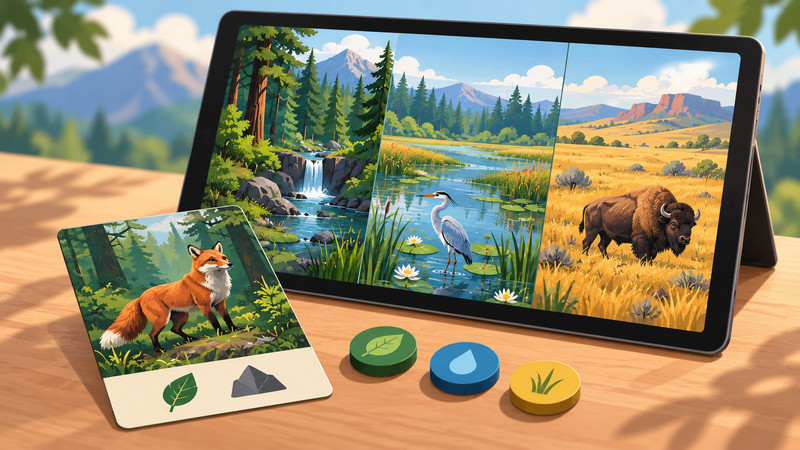
If you love Wingspan, you can make your own Wingspan-style game on iPad with hyperPad: a card-based nature strategy game with habitats, resources, and engine building. Start with one playable turn: draw a card, read its requirements, choose a habitat, pay a resource cost, place the card, and update the score.
That turn is a better first milestone than trying to reproduce a commercial board game. Wingspan is a useful reference for card-driven engine building, but its name, artwork, card text, interface, and rules belong to its creators. Build an original system with your own theme, data, art, and scoring.
Define the decision in one turn
A strategy game becomes interesting when the player must choose between options with different costs and results. For a small nature game, use three habitats and three resources.
For example, the player might place an original bird card in a forest, wetland, or grassland. Each placement could change food, nesting material, or observation points. The habitat choice should affect later turns instead of awarding points immediately every time.
| Turn stage | Player action | State change |
|---|---|---|
| Draw | Reveal one card | Set the active card |
| Inspect | Read habitat, cost, and effect | No state changes yet |
| Choose | Select an eligible habitat | Store the selected habitat |
| Resolve | Confirm the placement | Pay resources, place the card, apply its effect |
| End turn | Continue to the next round | Clear temporary state and increase the turn number |
Keep the first version local and single-player. Networked multiplayer, online accounts, and community leaderboards are separate systems, and you can prove the core strategy without them.
Organize the Project around state
Use one Scene for the board. Add habitat Objects, resource labels, a card panel, Confirm and Cancel buttons, and a controller Object.
Store the current game state as Object Attributes on the controller:
| Attribute | Starting value | Purpose |
|---|---|---|
| turnNumber | 1 | Tracks progress through the session |
| gameState | draw | Limits which input is currently valid |
| food | 3 | Pays card costs |
| materials | 2 | Supports a second type of placement cost |
| score | 0 | Records the result of completed effects |
| activeCard | none | Identifies the card being considered |
| selectedHabitat | none | Stores the player's pending choice |
Use Get Attribute when logic needs a value and Set Attribute when a valid action changes it. Keeping the values on one controller makes it easier to inspect a broken turn.
Store each card as data
A card needs more than a picture. Give it a stable ID and define the values its rules need:
- card name;
- habitat;
- food cost;
- material cost;
- immediate effect;
- points;
- fact text or flavor text.
A Dictionary can group these keys and values. Use Get Dictionary Value to read a specific field when the card is shown or resolved. If a value changes during play, Modify Dictionary can update it.
Begin with six original cards. That is enough to test variety without turning data entry into the project.
If you use real wildlife information, check every fact against a reliable source and record where it came from. The Cornell Lab's bird guide is one place to research North American species. Source facts do not automatically grant permission to reuse photographs, recordings, or illustrations. Use media you created or licensed for the Project.
Connect the visual Behavior flow
1. Draw a card
When gameState is draw, use Random Number to choose from the cards that remain. Set activeCard, display its Graphic and text, then change gameState to choose.
For repeatable testing, temporarily draw cards in a fixed order. Restore random selection only after every card resolves correctly.
2. Select a habitat
Add Started Touching to each habitat Object. Use If to confirm that the game is in choose state and that the active card can be placed there.
When the choice is valid, set selectedHabitat and highlight that habitat. Do not deduct resources yet. The player should still be able to cancel or select another valid habitat.
3. Confirm and resolve once
The Confirm button should check all requirements again:
- the game is in
choosestate; - a habitat is selected;
- the habitat is eligible;
- the player has enough resources;
- the card has not already been resolved.
When every check passes, set gameState to resolving. Deduct the costs, place the card Graphic in the habitat, apply its effect, and update the score. Then set the state to turnEnd.
Changing the state before the resource and score updates prevents a quick double tap from resolving the same card twice.
4. End and reset the turn
At the end of the turn, increase turnNumber, clear activeCard and selectedHabitat, remove temporary highlights, and return gameState to draw.
Keep the complete loop short enough that you can repeat it many times while testing.
Make choices affect later turns
A card-driven strategy game needs consequences that carry forward. Add one simple relationship before adding more cards.
For example:
- a forest card reduces the food cost of the next forest placement;
- a wetland card adds one extra card choice on a later turn;
- a grassland card awards a point when another grassland card is placed.
Store each bonus as explicit state. Avoid text that promises an effect the Behaviors do not apply.
The official Wingspan page describes that game as card-driven and engine-building. Use that only as a design-study reference. Your finished Project should have its own rules, balance, visual identity, and writing.
Test the full decision
Run the same checklist for every card:
- Can it appear only when expected?
- Do its text and stored values match?
- Can it be placed only in eligible habitats?
- Does Confirm fail when resources are too low?
- Does Cancel leave resources and score unchanged?
- Can a double tap resolve the card only once?
- Does its effect change the correct later turn?
- Does the next turn begin with temporary state cleared?
Then test the session-ending rule. Decide whether the game ends after a fixed number of turns, a full deck, or a target score. Show the result once and disable further card input.
For the broader structure of boards, turns, and win conditions, read how to make a digital board game on iPad.
Build a six-card prototype
Create three habitats and six original cards. Give each card one cost and one effect. Make every turn move cleanly through draw, choose, resolve, and reset. Once that small system produces real tradeoffs, expand the deck and rebalance the values instead of adding unrelated features.