Make Games on iPad with No Experience

The Ultimate Step‑by‑Step Guide
Game development doesn’t have to be complicated. Today, even beginners can make real, playable games on an iPad without writing a single line of code. Thanks to no-code platforms like hyperPad , creating your first game has never been easier.
If you’ve ever searched:
- “How to make a game with no coding”
- “Can you make games on iPad?”
- “Best game engine for beginners”
- “How to publish a mobile game”
This guide is for you. We’ll walk you through hyperPad’s beginner-friendly workflow , highlight trending beginner questions, and show how you can turn your iPad into a portable game studio.
Why Beginners Should Start With No-Code iPad Game Development
Traditional engines like Unity or Unreal require programming skills, software installations, and sometimes high-end computers. For newcomers, this creates a steep learning curve.
No-code platforms solve this by letting you design, test, and publish games using visual logic systems , eliminating the need for typed code.
hyperPad Advantages
hyperPad is specifically built for iPad, making it perfect for beginners who want on-the-go game creation. Its features include:
- Drag-and-drop visual scripting (no coding needed)
- Built-in 2D physics engine for realistic gameplay
- Animation and particle systems
- Sound and UI integration
- Real-time testing directly on your iPad
- Option to export for App Store publishing
This makes it easy to focus on game design and creativity , rather than debugging code.
What You Need to Start
Many beginners ask:
“What equipment or skills do I need to make games on iPad?”
With hyperPad, requirements are minimal:
Must-have:
- iPad
- hyperPad installed
- A creative game idea
Optional but helpful:
- Apple Pencil for precise design
- Custom graphics or sound assets
- Apple Developer account (for App Store publishing)
hyperPad also offers a built-in asset library with graphics, sounds, fonts, and animations so you can start creating immediately.
Step‑by‑Step: Make Your First Game on iPad
Step 1: Start a New Project
Open hyperPad and create a new project. A project contains:
- Scenes (levels/screens)
- Game objects (player, enemies, platforms)
- Behaviors (game logic)
- Assets (graphics, sounds, animations)
Popular beginner games include: platformers, endless runners, simple puzzle games, and interactive stories.
Step 2: Add Objects to Your Scene
Drag and drop objects like players, platforms, obstacles, and backgrounds into your scene.
Beginners benefit from hyperPad’s intuitive visual editor , which works like familiar design apps such as Procreate or Photoshop.
Step 3: Build Game Logic with Visual Behaviors
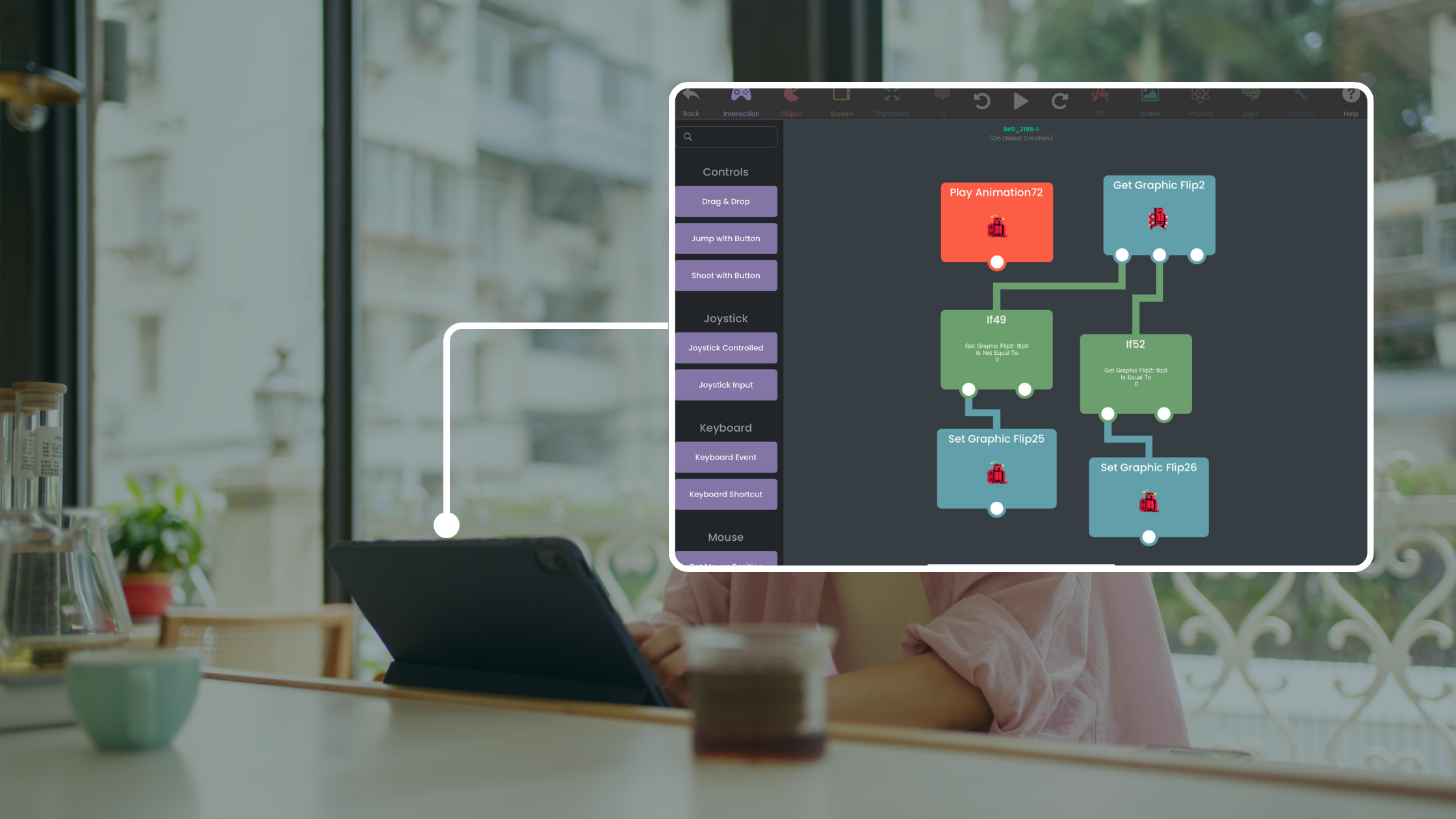
Instead of coding, hyperPad uses visual behavior blocks. Connect events and actions like a flowchart.
Example player jump logic:
When player touches screen
→ Jump
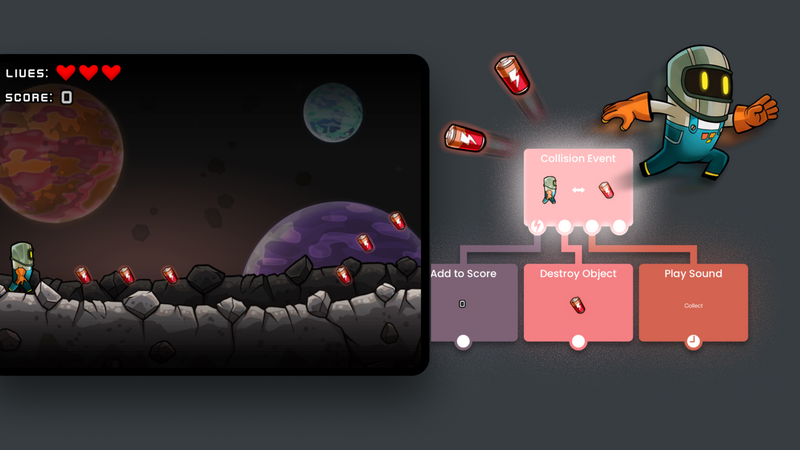
Example enemy collision:
When player collides with enemy
→ Reduce health
→ Restart level
This system allows beginners to create complex game mechanics without writing code.
Step 4: Add Physics and Animations
hyperPad’s built-in 2D physics engine handles:
- Gravity
- Collisions
- Forces
- Moving platforms
Animations can be added with keyframes, sprite sheets, or built-in tools. You can also add particle effects, sounds, and UI elements for a professional finish.
Step 5: Test Your Game Instantly
One of hyperPad’s biggest advantages is real-time testing.
- Test gameplay instantly
- Debug mechanics immediately
- Experiment with new ideas
This rapid iteration helps beginners learn faster and refine their games efficiently.
Step 6: Share or Publish Your Game
Once complete, you can:
Share with the Community: Upload your project to the hyperPad Hub for feedback and collaboration.
Publish to the App Store: Export your game for iOS publishing. Your iPad game can become a real App Store release, keep 100% of your revenue.
Popular Beginner Game Types
Many new creators start with:
- Platformers
- Endless runners
- Puzzle games
- RPGs
- Interactive stories
- Arcade games
hyperPad also supports advanced features like multiplayer networking, UI creation, and custom animations , allowing beginners to scale up over time.
Questions Beginners Ask
Q: Can I make a game with no programming experience? A: Yes. hyperPad’s visual scripting lets anyone create functional games without writing code.
Q: Do I need a computer? A: No. hyperPad runs entirely on iPad. You can design, test, and even publish from your tablet.
Q: How long will it take to make a game? A: Simple games can be made in a few hours to a few days, depending on complexity.
Q: Can I publish to the App Store? A: Yes. hyperPad supports exporting for iOS and submitting to the App Store.
Q: What skills will I learn? A: Game design fundamentals, visual logic, physics, animation, asset management, and project iteration.
Why iPad Game Development Is Trending
iPad game development is booming because it allows creators to:
- Work anywhere
- Sketch ideas instantly
- Test gameplay in real-time
- Build games without desktop setups
hyperPad transforms your iPad into a portable game studio , letting beginners produce real games fast.
Beginner Tips for Success
- Start small—your first game doesn’t need multiple levels.
- Focus on one mechanic at a time.
- Use hyperPad’s asset library before importing custom graphics.
- Test frequently—instant feedback is key.
- Share early—community feedback helps you improve faster.
Game development is no longer limited to programmers. With hyperPad , anyone can create, test, and publish games directly from an iPad.
Even as a complete beginner, you can:
- Learn game design fundamentals
- Build playable, polished games
- Share with a community or go live on the App Store
Start today, and your iPad could be the first step toward your indie game studio.
✅ Pro Tip: Your first project doesn’t need to be huge. Even a single-level platformer teaches core gameplay logic, physics, and asset management , building the foundation for your next game.
TryhyperPad Starter for free! For unlimited game creation and publishing upgrade to our full version of hyperPad. Keep 100% of your royalties and more! All for you with a one-time payment, no subscriptions.