How does Scratch compare to hyperPad for game creation?

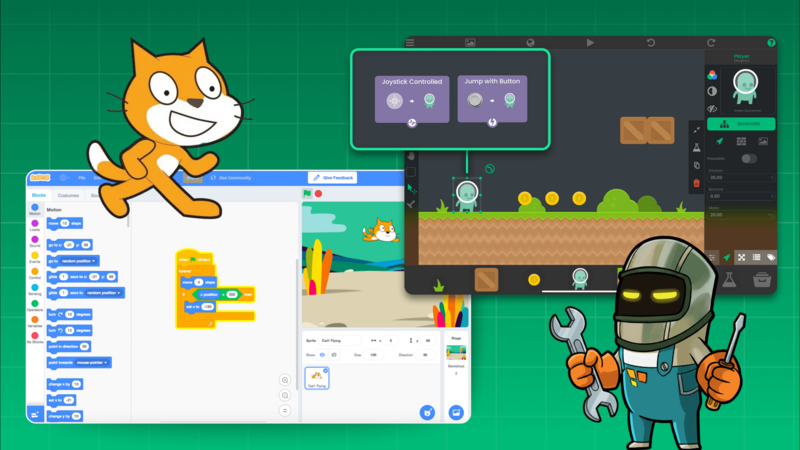
Scratch vs hyperPad
If you’ve ever learned game creation with Scratch , you already understand the magic of visual coding; connecting colorful blocks to make your ideas come alive. But while Scratch is a great place to start, many creators quickly realize they want more power, flexibility, and creative control.
That’s where hyperPad shines.
hyperPad is the most powerful visual coding and game development app for iPad. It’s built for creators of all ages who want to make real games, interactive stories, or apps. All without writing a single line of code.
In this post, we’ll look at common beginner questions from Scratch learners and show how hyperPad does it all faster, easier, and better using its unique visual coding behaviour system.
🧩 “What is a sprite?”
In Scratch, sprites are your characters and objects. In hyperPad , these are called Objects ; and they’re far more powerful.
Objects in hyperPad can be characters, platforms, backgrounds, menus, or even invisible triggers that control your game’s logic. Each Object has its own set of Behaviours , which are visual logic blocks that make things happen, from movement and animation to sound and physics.
You can import your own art, draw directly on iPad, or use layered graphics for more complex designs. Everything is interactive and customizable.
🎮 “How do I make my character move?”
In Scratch, you stack motion blocks like “move 10 steps.” In hyperPad , you use Behaviours like Move by Velocity or Apply Force , giving your character realistic physics and smooth motion instantly.
You can connect these to touch controls, tilt inputs, or key presses, depending on your project. Every change updates live , so you can test your game instantly with one tap.
No compiling. No waiting. Just pure creation.
🧱 “What are blocks and how do I use them?”
Both Scratch and hyperPad use visual logic, but hyperPad’s Behaviour Blocks take it to the next level.
Each Behaviour in hyperPad is a powerful, modular piece that controls gameplay, animation, sound, UI, or even data. You connect them visually to build logic flows that look like diagrams, not code.
Unlike Scratch, hyperPad Behaviours can:
-
Detect collisions and physics interactions
-
React to timers, triggers, or user input
-
Control animations, levels, and scene transitions
-
Communicate between multiple objects
It’s the same simplicity, with far more capability.
🖼️ “How do I change the background or add new sprites?”
In hyperPad , you can add backgrounds, objects, or UI layers directly from the Object Menu.
Import your own images, design backgrounds, or add parallax layers to give your game depth. Everything is touch-based; just drag, drop, and edit visually.
You can even create menus, overlays, and HUDs that behave like professional mobile games.
⚡ “Why doesn’t my code work when I click the green flag?”
In Scratch, beginners often wonder why their game doesn’t start. hyperPad avoids that confusion with a clear event system.
Behaviours like When Project Starts , When Object Touched , and When Key Pressed make it obvious what triggers what.
You can see every logic path visually; no hidden errors, no missing green flags. Just instant feedback and easy debugging.
⌨️ “How do I make something happen when I press a key?”
hyperPad gives you multiple input options. You can:
-
Use keyboard controls when testing on Mac or PC
-
Create custom on-screen buttons for touch-based gameplay
-
Use tilt controls to move or steer your character
All of this can be done visually with Behaviours. You can even make your own dynamic control layouts, perfect for touchscreen games.
💬 “How can I make my sprite talk or show messages?”
hyperPad makes dialogue easy and flexible.
You can use Behaviours like Show Label or Show Popup to create text boxes, character dialogue, or tutorial prompts. Customize your fonts, colors, and timing, or build an entire dialogue system with branching conversations.
Since hyperPad supports custom UI and layers, your messages can look just like they do in real App Store games.
✨ From Beginner to Game Developer. All on iPad.
Scratch is a great starting point for visual coding, but hyperPad gives you tools to go further.
You can build real, professional-quality iOS games — complete with physics, animation, sound effects, and monetization — all on your iPad.
If you’re a student learning game design , a teacher running a STEAM class , or a creator dreaming of publishing your own game , hyperPad gives you everything you need to make it happen.
🎮 Create Games and Apps on iPad. No Coding Required Start building your first game today with hyperPad , the easiest and most powerful no-code visual game creator for iPad.