What Is a Digital Audio Workstation? DAW Types and Comparison

If you are writing music for your game, you need a digital audio workstation. This guide covers what a DAW is, the types you will run into, and how four of the common ones compare.
What Is a Digital Audio Workstation?
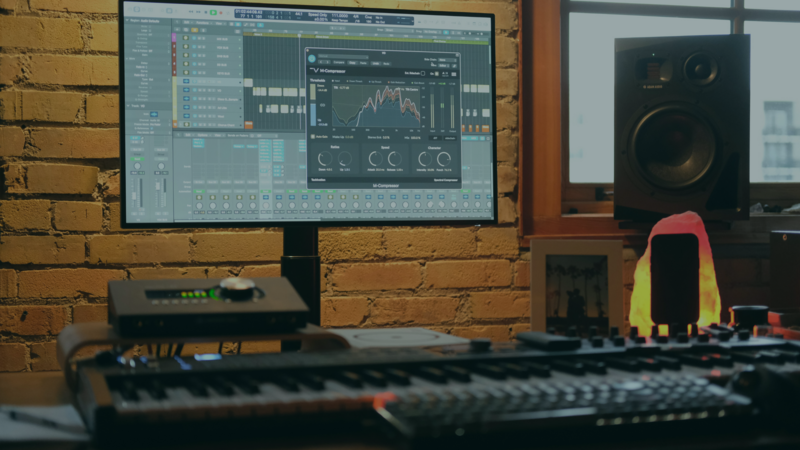
A digital audio workstation (DAW) is the software you record, arrange, edit, and mix music in. It is the studio, moved onto a computer.
Every DAW does roughly the same four things:
- Record audio. Capture a microphone, a guitar, or anything else through an audio interface.
- Sequence MIDI. Write notes on a grid and play them back through a virtual instrument, without recording a live performance.
- Edit. Cut, loop, retime, and pitch-correct what you have.
- Mix and export. Balance the parts, add effects, and render a finished file.
For game audio you will mostly live in the MIDI and export parts. You write a loop, mix it, and export a WAV or MP3 that your game plays back.
Types of DAWs
DAWs tend to fall into four groups. Knowing which group you want saves a lot of trial downloads.
Linear DAWs. You arrange audio on a timeline from left to right, the way a tape machine works. Logic Pro, Pro Tools, and Reaper sit here. Best for scoring, soundtracks, and anything with a fixed structure.
Pattern and loop DAWs. You build short patterns and stack them into a track. FL Studio is the well-known one. This suits beat-driven game music, where you want an eight-bar loop that never sounds tired.
Performance DAWs. Built for playing live, with clips you trigger in any order. Ableton Live's Session View is the example. Useful if you want to improvise a track before committing to an arrangement.
Audio editors. Not full DAWs. Audacity and similar tools record and edit a single file well but are weak at multi-track arrangement. Fine for cleaning up a sound effect, limiting for a score.
Most modern DAWs blur these lines. Ableton has a linear Arrangement View, and FL Studio has a playlist. The category still tells you what the software is best at.
Comparing Four Popular DAWs
Prices below were current when this was written. Check each site before you buy, since editions and pricing change.
1. FL Studio
Price: Fruity Edition ($99), Producer Edition ($199), Signature Bundle ($299).
What stands out:
- Pattern-based sequencing, which makes loop writing fast
- A large library of built-in instruments and effects
- VST and AU plugin support
- Free lifetime updates on every edition
Who it suits: Beatmakers and electronic producers. If your game music is loop-driven, this is the shortest path from idea to playable loop. The free lifetime updates matter more than they sound, since you buy once and stop thinking about it.
2. Ableton Live
Price: Intro ($99), Standard ($449), Suite ($749).
What stands out:
- Session View for triggering clips and improvising
- Strong audio and MIDI manipulation
- Built-in instruments and effects, plus Max for Live in Suite
- Warp, for stretching audio to a new tempo without artifacts
Who it suits: Producers, DJs, and anyone performing live. For game music, Warp is the feature you will use most, since it lets you fit existing audio to your game's tempo.
3. Logic Pro
Price: $199.99 for Mac.
What stands out:
- A deep set of virtual instruments and effects included
- Advanced MIDI editing and score notation
- Flex Time and Flex Pitch for precise timing and pitch edits
- Opens GarageBand projects directly
Who it suits: Composers and engineers already on a Mac. If you started in GarageBand, Logic is the natural next step, and your old projects come with you.
4. Reaper
Price: $60 personal license, $225 commercial.
What stands out:
- Customizable to an unusual degree, down to the theme and the action list
- VST, AU, and JS plugin support
- Solid multi-track recording and editing
- Multi-channel and surround mixing
Who it suits: Anyone on a budget, and anyone who wants to reshape the software around their own workflow. The evaluation period is generous and the install is tiny.
Free DAWs
You can write a complete game soundtrack without paying anything.
- LMMS is free and open source, on Windows, macOS, and Linux. Pattern-based, closest in feel to FL Studio.
- Cakewalk by BandLab is a free full DAW for Windows, with professional recording and mixing tools and plugin support.
- Audacity is free and open source. Use it for editing and cleaning up individual sounds rather than for arranging.
- GarageBand is free on Mac and iPad, and it is the easiest starting point if you are already in Apple's ecosystem.
Which DAW Should You Pick for Game Music?
A short version:
- You want loops, fast. FL Studio, or LMMS if you are not spending money.
- You are on a Mac already. GarageBand first, then Logic Pro when you outgrow it.
- You want to perform or improvise. Ableton Live.
- You want the most software for the least money. Reaper.
- You are working on iPad. See our guide to DAWs for iPad game developers.
One practical note: whichever you choose, export your game music as a looping file with no silence at the start or end. A few milliseconds of dead air at the loop point is audible, and it is the most common problem in first game soundtracks.
Test each asset inside the running Scene, not only on its own. Keep it when it makes the action clearer, strengthens feedback, or supports the atmosphere.
Get the Music into Your Game
Once you have a WAV or MP3, you need somewhere to play it.
With hyperPad you build games on iPad by connecting Behaviors into a flowchart of your game's logic. Import your audio, trigger it with a Play Sound Behavior, and test the timing on the same device you are building on.
Test each asset inside the running Scene, not only on its own. Keep it when it makes the action clearer, strengthens feedback, or supports the atmosphere.