

Raycast Test
Description
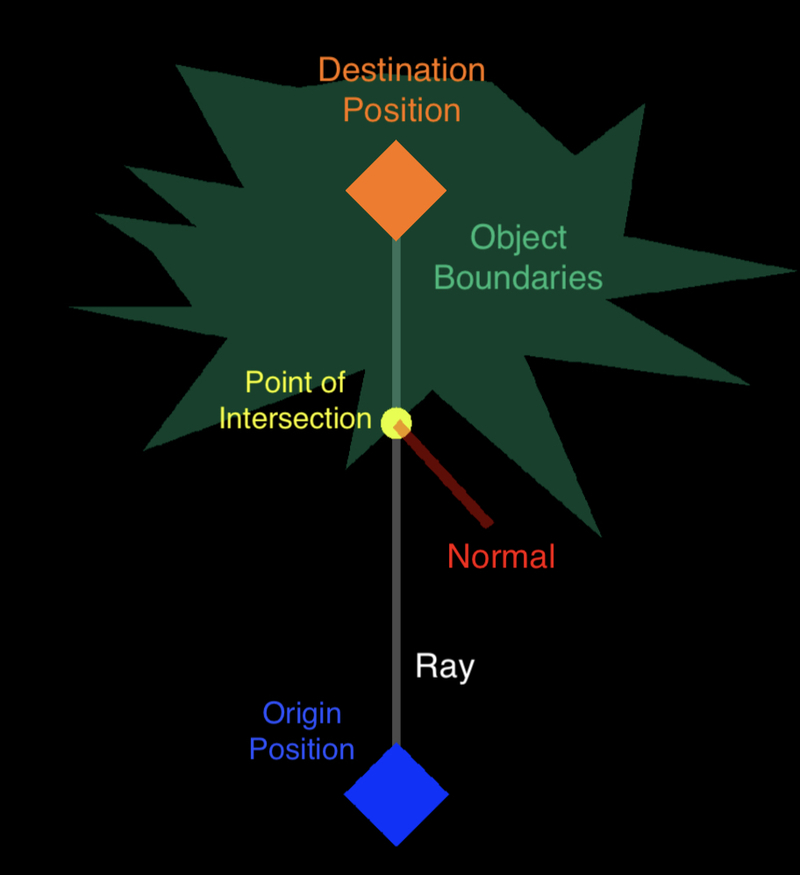
The Raycast Test behavior shoots an imaginary invisible ray from a starting point (origin) to a destination point and check if any objects intersect in that ray. Rays only intersect with non-scenery objects.
Properties
Triggers Once on Event
| Raycast Type |
|
| Layer |
The ray will only intersect with objects in a layer you have selected. You have an option to unrestrict the ray to all layers. |
| Intersect With |
The ray can intersect with any non-scenery object or can only intersect with objects you have selected. You can use tag(s) to determine which group of objects the ray can intersect with. |
| Origin Point |
The starting world position where the ray will originate from. |
| Destination Point |
|
Outputs
| X |
This is the specific location where the intersection happened along the X axis. |
| Y |
This is the specific location where the intersection happened along the Y axis. |
| Distance |
The behavior will output the distance from the origin to the intersection in meters. |
| Normal |
The behavior will output the normal angle of the intersection. This is the angle of a parallel line to the side of an object that was intersected with. |
| Intersected |
The behavior will output 1 if the ray has intersected with any object. If the ray did not intersect with any object, the behavior will output 0 instead. |
Examples
- You can check if there's an object in front of your enemy that's blocking its path to the player.
- You can have a laser that can damage your player but can be blocked off by other physics objects.
- You can have enemies that chase player on sight - perfect for stealth games where the player can take advantage of their environment to prevent being spotted.