Top Apps To Make Games for Free in 2026


Creating games for free has never been easier. Many tools let you bring ideas to life, but hyperPad stands out as the fastest, most flexible, and easiest way to make real games, directly on iPad. Here’s a look at popular free apps, and why hyperPad is the ultimate choice for beginners, students, and hobbyists.
⭐ hyperPad Starter
The BEST Game-Making App
Best for: Beginners, students, solo creators, iPad users Platform: iPad
hyperPad removes all the barriers that usually make game creation intimidating. You can drag and drop behaviors , test instantly on your iPad , and see your ideas come alive visually. All with no coding! It’s perfect for rapid prototypes, educational projects, game jams, or even fully playable games. Try it for free with hyperPad Starter.
🚀 Instant Idea to Playable Game
Other engines require importing assets, coding logic, setting up controls, and running emulators. With hyperPad:
-
Build games directly on iPad
-
Test in real time
-
Iterate in minutes, not days
🧠 Visual Coding That Makes Sense
hyperPad’s visual logic system shows:
-
How behaviors flow
-
How systems interact
-
Why a mechanic works
This helps beginners, students, and advanced users understand programming concepts quickly while seeing results instantly.
📱 Built for iPad, Not Ported to It
Unlike most engines, hyperPad is designed specifically for touch and Apple Pencil workflows. You can create art, logic, levels, and mechanics on iPad! Skip the complex build pipelines.
🆓 Truly Affordable and Fair
-
Build full games for free with hyperPad Starter and try our visual coding system!
-
Access all features upfront, then upgrade to hyperPad for zero limitations.
-
One-time payment for a lifetime.
No subscriptions, free updates. Just creating games!
Other Free Game-Making Tools
Here’s a brief overview of other popular free options. These are useful for certain projects, but hyperPad remains the most complete and beginner-friendly with pro capabilities.
GDevelop – No Code Game Creator
Best for: PC users who want a drag-and-drop 2D engine Platforms: Windows, Mac, Linux, web, mobile
GDevelop is open-source and beginner-friendly, but it lacks hyperPad’s iPad-first design and live testing capabilities.
GameMaker – Indie-Friendly Engine
Best for: 2D games and beginners who want room to grow Platforms: Windows / Mac
GameMaker is great for building professional-quality 2D games, but requires downloads and setup, unlike hyperPad’s instant start on iPad.
Builda – Mobile Game Prototyping
Best for: iPad creators and collaborative projects Platforms: iPad / iPhone
Builda allows drawing, animating, and testing games on iPad, but hyperPad surpasses it with visual coding, behaviors, and full game logic support.
Defold – Professional Engine for Free
Best for: Developers seeking advanced control Platforms: Desktop, mobile, web, consoles
Defold offers professional features but is more complex and has a steeper learning curve compared to hyperPad’s accessible, beginner-friendly approach.
Phaser – HTML5 Game Framework
Best for: Web games and JavaScript developers Platforms: Desktop & mobile via browser
Phaser is open-source and powerful for web games, but requires coding, unlike hyperPad’s drag-and-drop interface and iPad-first experience.
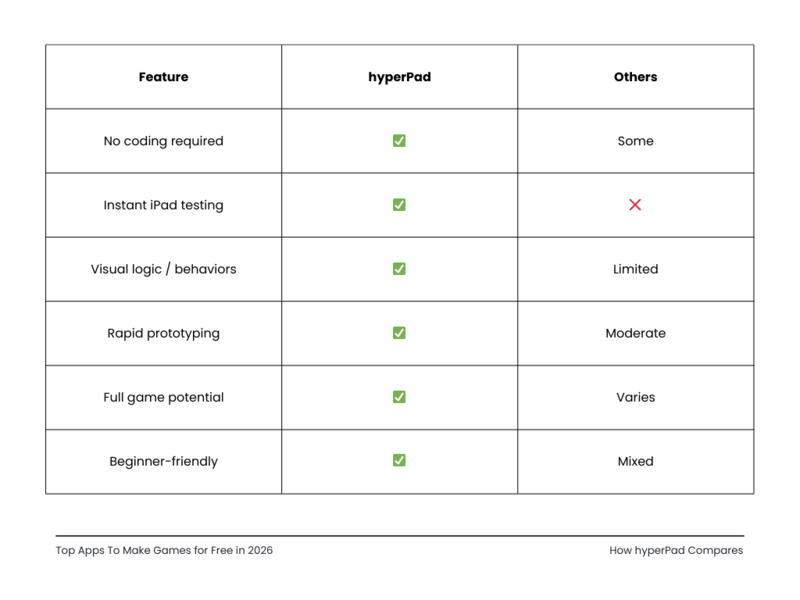
🧩 How hyperPad Compares
Start building games on hyperPad today!
For speed, flexibility, and iPad-first creation, hyperPad is the undisputed best free app to make games. It removes technical barriers, builds confidence, and turns your ideas into playable games faster than any other tool.
Watch your game ideas come alive instantly! 🎉