The Game Jam Guide for hyperPad Users: From Theme to Submission

A game jam gives you a theme and a deadline, usually 48 to 72 hours, and asks you to finish a game before time runs out. This guide is for hyperPad users who want to take part. It covers how to find a jam that accepts iPad games, how to plan your time and scope, which free tools help, and how to submit and share your game when the clock stops.
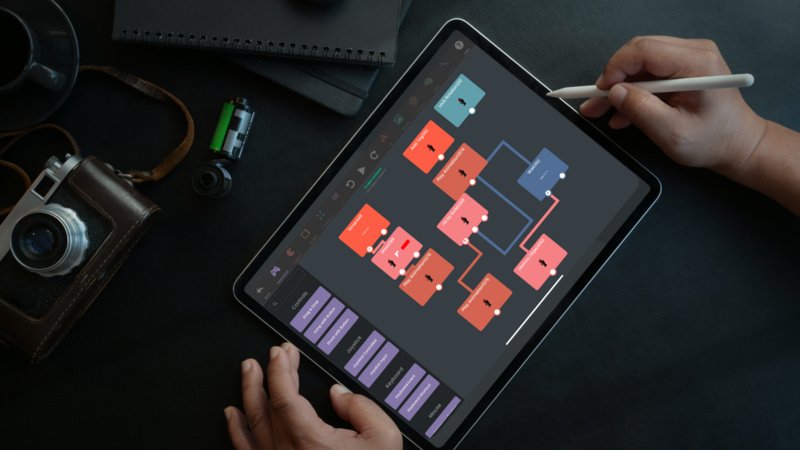
You don't need to write code. In hyperPad you build with Behaviors, connecting actions and events into a flowchart of your game's logic, so you can go from an idea to a playable game on one iPad.
Find a Jam You Can Enter
hyperPad community challenges
hyperPad runs community challenges and has partnered on jams in the past, and they're a low-pressure place to start. Entries are usually submitted by Publishing your game to the hyperPad Hub. Schedules, themes and rules change from one event to the next, so check the hyperPad Discord for current challenges before you plan.
Bigger jams
- Global Game Jam happens once a year, over one weekend, at sites around the world and online. Our guide on how to participate in the Global Game Jam with iPad walks through it step by step.
- Ludum Dare is one of the biggest online jams. It runs a 48-hour solo event and a 72-hour event built around a surprise theme. Read how to join Ludum Dare before you start.
- itch.io Jams lists hundreds of jams at any time, from pixel-art jams to 10-day jams with prizes.
- GameDev.net also lists jams and challenges.
Check the rules before you commit
Not every jam accepts iPad games. Check three things on the jam page first:
- Platform rules. Some jams require a browser or desktop build. hyperPad doesn't export to HTML5 or the web. Players can try hyperPad games through the hyperPad Hub app on iPhone, iPad and Apple silicon Macs, so ask the organizers whether a Hub link counts.
- Submission format. Find out whether a link, a gameplay video or screenshots are enough.
- Length. A 48-hour jam suits a single mechanic. A 10-day jam leaves room for custom art and sound.
Before the Jam
- Read the rules and write down the deadline in your own time zone.
- If you use hyperPad Starter, which is limited to one Project, clear space so you can start building the moment the theme is announced.
- Build a tiny practice Project, such as an Object that moves when you tap it, so you know where things are in the Behavior Editor.
- Learn how prefabs and templates in hyperPad work, then check whether the jam allows pre-made content.
- Practice recording gameplay with iPad screen recording. You'll want a clip for your submission.
- Read the judging criteria. Many jams score creativity, theme, polish and how fun the game is.
- Join the hyperPad Discord so you can ask for help mid-jam.
Plan Your Time
Split the jam into blocks and stick to them:
- Kickoff: read the theme, brainstorm, and pick one core mechanic. Interpret the theme in a way that interests you.
- Middle: get the core loop playable with placeholder Objects. Add a goal and a way to lose. Share progress and ask for feedback.
- Final stretch: add art, sound and a title screen. Test the finished version, then submit early.
Feature creep is the most common way jam games fail. If you have to choose, finish one mechanic well rather than five halfway.
Build a Game People Can Play
Start with a simple concept
Pick a mechanic that's fun and easy to build. Use as few mechanics as you can. A tap, a score and a goal are enough for a complete jam game.
Use what hyperPad gives you
Build mechanics quickly with Behaviors, and press play after each change. Start from built-in assets in the Asset Library or plain shapes, and swap in final Graphics later.
Design for touch
Keep controls simple, especially for touch-based gameplay. Give players a clear objective so they know what to do in the first few seconds.
Polish without overcomplicating
Spend your polish time on game feel: smooth animations and satisfying feedback when the player does something. Simple sound effects make a big difference. Use particles and shader effects sparingly.
Adapt when things break
Expect surprise bugs and design changes. If something isn't working, simplify it rather than rebuild everything. Put the core experience ahead of extras.
Work With a Team
Team up with artists, designers and musicians to round out your game. Since a hyperPad Project lives on one iPad, agree early on who builds and how teammates will send Graphics and sound files. Check in often so everyone stays aligned on the goal. If you're looking for teammates, ask in the Discord or in the jam's community page.
Free Resources for Game Jams
Art and sound
- Kenney.nl: free 2D and 3D game assets
- OpenGameArt: a collection of free game assets
- Freesound.org: free sound effects
- Pixabay: royalty-free images and music
Check each asset's license, and check the jam's rules on outside assets.
Learning
- hyperPad YouTube channel: official tutorials
- GDC Vault: talks from game industry developers
Organization
- Trello: track tasks on a simple board
- Notion: write a one-page design doc
- Google Drive: share Graphics and sound files with your team
Submit on Time
- Make sure your game meets the jam's submission requirements.
- Publish your game to the hyperPad Hub and grab the link.
- Add a short gameplay clip, a few screenshots and a two-line description.
- Leave time before the deadline. Uploads take longer than you expect.
Share Your Game After the Jam
The jam doesn't end when you submit. Play and rate other entries. On some jam sites, including Ludum Dare, rating other games helps your own entry get seen. Then share what you made:
- hyperPad Hub: keep improving your game and Publish new Versions.
- Social media: post clips and progress with tags like #gamedev, #indiedev and #hyperPad, and share in communities like r/IndieDev and r/gamedev.
- Video: make a short devlog or trailer for YouTube or TikTok.
- Mobile press: if you take the game further and Export it to the App Store, sites like Pocket Gamer cover mobile games.
Learn From Every Jam
Write down one thing that went well and one thing you'd change next time. Play other submissions to see how other creators read the same theme. Carry those lessons into your next Project.
Then share your jam game and what you learned in the hyperPad Discord. Jam entries are a good way to meet other creators and find teammates for the next one.