Prefabs and Templates in hyperPad

Build Bigger iPad Games in Less Time
If you're an experienced game developer, hyperPad's prefabs and templates give you fine control over your projects. hyperPad is a no-code game engine for iPad. You make fully functional games with visual coding, drag-and-drop logic, reusable assets, and quick prototyping.
Prefabs and templates let you reuse Objects, share Behaviors across Scenes, and keep large, complex projects consistent. Beginners will find them easy to learn. Experienced developers will like how much repeated work they save.
What Are Prefabs and Templates?
Both prefabs and templates store the settings and Behaviors of a single Object from the Asset Library. They differ in how their copies (instances) behave:
-
Templates give you flexibility. You can change each instance on its own. For example, a Player template might use different movement physics in an underwater level than in a land level. Templates let you tweak an Object in one Scene without affecting the others.
-
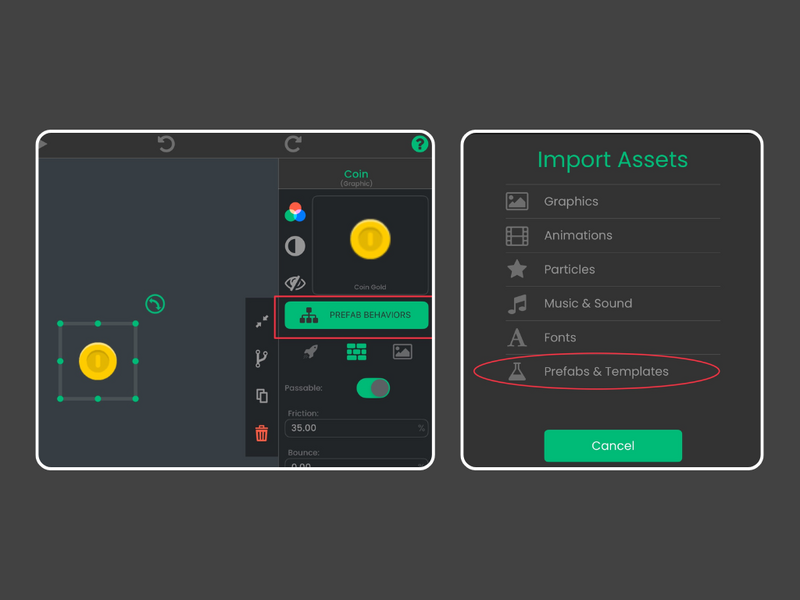
Prefabs keep multiple Objects consistent. Every instance shares the same Behaviors. For example, you can place a coin prefab all over a level. Edit one coin's Behaviors and every other coin updates too. That saves time and prevents mistakes, especially in large games.
Why Prefabs and Templates Help All Creators
Prefabs and templates help beginners, and they're essential tools for experts too:
-
Rapid iteration: Change the Behaviors of one prefab and see the update across your entire project. That saves hours of repetitive work.
-
Complex project management: Large games with multiple levels, dozens of enemies, and hundreds of interactive Objects are easier to manage when their logic stays consistent.
-
Collaboration: Share prefabs or templates with team members or other developers, so team projects move faster and stay organized.
-
Creative experimentation: Test variations of an Object in different Scenes with templates, or keep strict consistency with prefabs while you polish your game.
https://www.youtube.com/embed/1S8it12n1IM
Practical Examples for Every Level of Creator
Here are some ways to use prefabs and templates to build faster and try more ideas:
-
Player Characters: Create a Player template for multiple levels. Beginners can learn movement logic. Experts can add advanced mechanics like double jumps, underwater physics, or unique power-ups per level.
-
Enemies: Build a basic enemy prefab with core AI. All instances share the same logic. Experts can layer on advanced Behaviors, attack patterns, or environmental interactions and keep everything consistent.
-
Coins and Collectibles: Use a coin prefab so every coin spins, floats, or triggers effects exactly the same way. Change one coin's Behaviors and they all update at once. That works for small games and large ones.
-
Destroyable Platforms: Prefabs make every breakable platform behave the same way, so your challenges stay consistent across levels.
-
Environmental Objects: Trees, rocks, bushes, traps, or interactive puzzles can all use templates or prefabs. Experts can build detailed ecosystems. Beginners can experiment without worrying about breaking the project.
-
UI Elements: Templates let you design reusable buttons, menus, and interactive elements. Customize individual instances without affecting the base template, or keep them all in sync with prefabs.
Why Experts Will Love Prefabs and Templates
For experienced creators, prefabs and templates save time and keep big projects organized. You build complex Behaviors once, repeat them across your game, and stay in control of your project. For example, you can:
-
Set up advanced AI once and have it apply to every enemy.
-
Create a multi-level world where environmental hazards always interact the same way.
-
Build a library of reusable game mechanics to share between projects, or even with other creators.
Prefabs and templates help large games stay manageable as they grow, and hyperPad stays approachable for beginners.
For You
hyperPad works for beginners and for large projects. Prefabs and templates help you prototype fast and keep a growing game consistent. Whether you're making your first game or your tenth, you'll spend less time on repeated work.
Continue with one working mechanic
Follow the iPad game development guide to scope one input, one result, and one reset. The Behavior Interface Overview explains how events connect to actions, and Scenes shows how to organize playable sections of a Project.