How to Monetize an iPad Game: Build, Test, and Publish

Monetizing an iPad game begins before you choose a price or place an ad. You need a game people can understand, a release path you can complete, and evidence that players want to return.
hyperPad creators offer two useful examples. TurtledoveGames used the hyperPad Hub to release and update Shorenight while receiving visible player feedback. Hakan Dede used hyperPad to create games that were later published on the Apple App Store. These are documented examples of testing and publishing. They are not proof of a particular income level, and no revenue figures are presented here.
Creator pages, hyperPad documentation, and Apple guidance reviewed October 8, 2026.
A realistic monetization path
| Stage | Question | Evidence to collect |
|---|---|---|
| Playable loop | Can a new player understand and finish a round? | Observed playtests and restart success |
| Audience test | Do people choose to play and return? | Hub plays, comments, updates, and repeat testing |
| Release preparation | Can you meet the publishing requirements? | Working export, store materials, testing, and compliance checks |
| Business model | Does the model fit the game and audience? | Price or ad plan, player impact, and current platform terms |
| Launch | Can people discover and understand the game? | Qualified store visits, first-time downloads, retention, and revenue |
Do not combine downloads, redownloads, store visits, ad impressions, and revenue into one success number. Each answers a different question.
First build a loop worth repeating
A complete loop needs an input, a visible result, a goal or failure condition, and a reliable restart.
Use Attributes to track score, currency, health, or progress. Set Attribute can change a stored value. Test whether a new player understands what that value means without being coached.
Before planning monetization:
- give the build to people who did not help create it;
- watch without explaining the controls;
- record where they hesitate, stop, or ask a question;
- revise one problem;
- test the loop again.
What TurtledoveGames demonstrates
The public Shorenight Hub page shows a Project released by TurtledoveGames with update notes, plays, reactions, and player comments. The page also shows a creator responding to feedback about saved progress.
The useful lesson is not a revenue claim. It is the release loop:
- publish a playable version;
- describe known issues honestly;
- listen to specific player questions;
- release updates;
- let the public Project record show how the game changes.
Hub engagement is not the same as App Store revenue, but it can help identify confusion, demand for features, and whether the core experience is ready for a broader release.
What Hakan Dede demonstrates
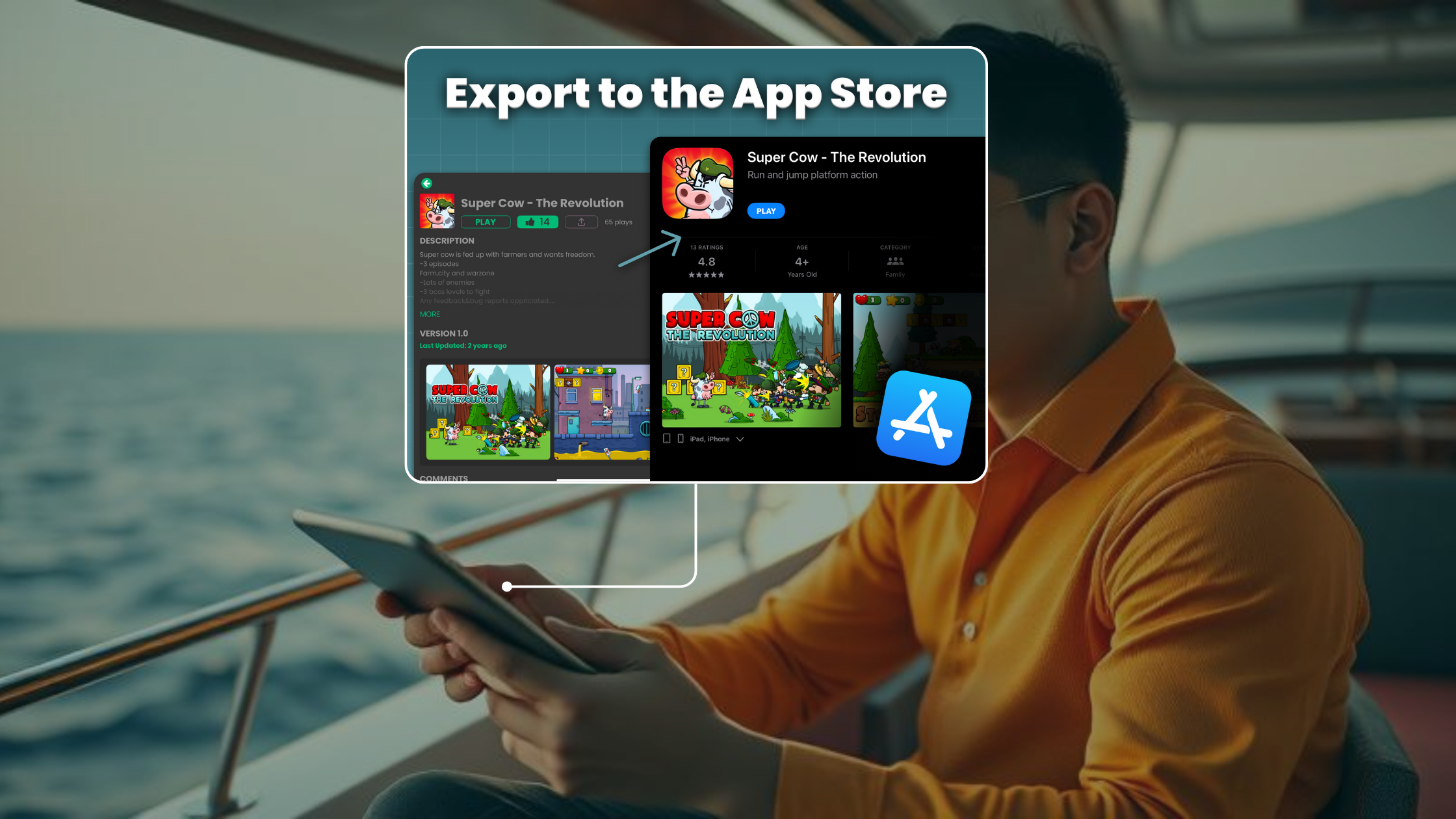
The hyperPad article Best iPad Games of 2026 You Can Create Yourself documents several games created with hyperPad by Hakan Dede and published on the Apple App Store, including Super Cow: The Revolution, Super Trucker, and Ball tales: The lost island.
That evidence supports a publishing claim: a hyperPad Project can follow the Xcode Export and Apple submission path to become an independent App Store game. It does not establish downloads, profit, or career outcomes.
Study the production lessons that can be seen in the finished games: a defined genre, multiple levels, consistent art, store presentation, and enough content for a standalone release.
Choose a business model after the game is clear
Possible App Store strategies include a paid download, advertising, or other models supported by Apple and the services you configure. The correct option depends on the game, audience, content rating, privacy obligations, and current platform agreements.
hyperPad’s Serving Advertisements documentation explains the current ad setup for exported Projects. Review the current Google and Apple requirements before implementation, especially for children’s content.
Do not add an ad simply because the Behavior exists. Decide where it appears, how it affects pacing, and what happens when the network is unavailable.
Understand the publishing workflow
You can build and test the Project on iPad. An independent App Store release uses hyperPad’s paid Xcode Export path and Apple’s external workflow. It requires a compatible Mac, Xcode, Apple developer services, App Store Connect, testing, and App Review.
Review hyperPad’s publishing and sharing information and Apple’s current App Store submission guidance before setting a launch date.
Prepare the store page
A store page needs to communicate the game quickly. Prepare:
- an accurate title and subtitle;
- an icon that remains readable at small sizes;
- screenshots that show real gameplay;
- a concise description of the player’s goal;
- privacy and content-rating information;
- support and marketing URLs;
- a tested build.
Do not use concept art to imply gameplay that is not in the submitted version.
Measure the launch without confusing the metrics
Track:
- qualified visits to the store page;
- first-time downloads;
- visit-to-download conversion;
- gameplay events or retention when configured;
- ad impressions or purchases where applicable;
- proceeds after applicable platform and service terms.
A spike in visits does not prove the game retained players. A download does not prove monetization. Revenue should be evaluated with the costs and reporting window that produced it.
Build evidence before making an income promise
TurtledoveGames shows how public iteration can create a feedback trail. Hakan Dede shows that creators have taken hyperPad-built games through an App Store release.
Use those examples as process evidence. Finish a playable loop, test it with real people, choose a model that fits the audience, and verify every publishing requirement before launch.