

Asset Library
Free access to hundreds of pre-made graphics, audio, animations and more. Whether you choose to use pre-made assets or import your own, we provide everything you need to become a game developer on iPad.
Try hyperPad for Free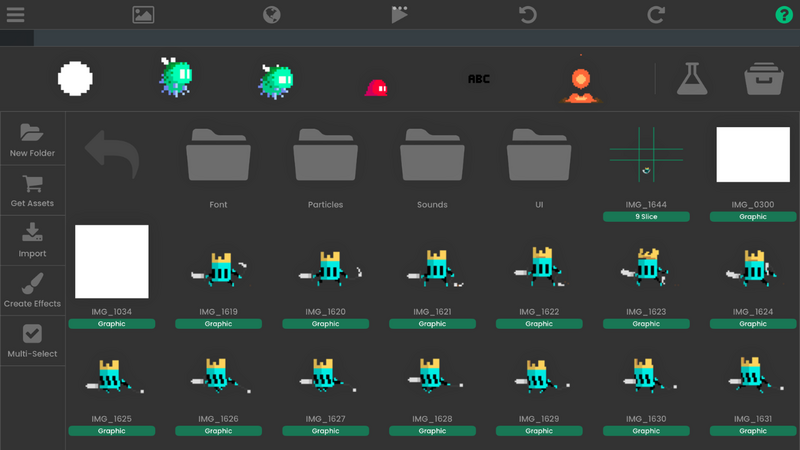
Organize and Access All Your Game Assets
The Asset Library in hyperPad is your central hub for importing, organizing, and managing all your project assets. From graphics and fonts to sounds, animations, and particle effects, everything you need is right at your fingertips. By default, a UI folder is created to help you get started, and you can import your own assets or browse free content from the hyperPad Asset Shop, which is regularly updated with new resources.
Flexible Tools for Every Asset Type
Game assets in hyperPad are categorized by type, making it easy to find and use what you need. You can multi-select assets to perform actions in bulk, import files from Dropbox, Camera Roll, or iTunes, and even edit sounds or particles directly in the Asset Library. Each asset type has its own features: graphics support transparency and retina resolution, animated assets are organized as frames, sounds work in multiple iOS formats, fonts include TTF and BMFont options, and 9 Slice objects scale while keeping edges intact.
With the Asset Library, creating, editing, and deploying your assets is fast, intuitive, and fully optimized for iPad game development.
The hyperPad Asset Library gives you easy access to a wide variety of assets, organized by type and ready to use in your projects. With powerful import, multi-select, and editing tools, you can quickly customize and manage all your graphics, sounds, fonts, animations, and particle effects directly on your iPad.
Learn More
Check out these resources to learn about our powerful game engine and start creating beautiful iOS games to share with the world! Keep 100% of your royalties.