






.svg)


.svg)
Custom Gestures and Multi-Touch
With hyperPad, you can design games and apps that respond to a wide range of touch inputs. From single taps and swipes to complex multi-touch gestures, you can assign actions to each interaction, creating intuitive and engaging experiences for players. The touch system makes it easy to control characters, navigate menus, or trigger events, all without writing code.

The Core Concept

Drag and drop objects directly onto your game canvas
See changes instantly as you build
Use natural touch gestures - pinch, zoom, rotate
Arrange elements spatially instead of mathematically
Layer, group, and organize scenes visually
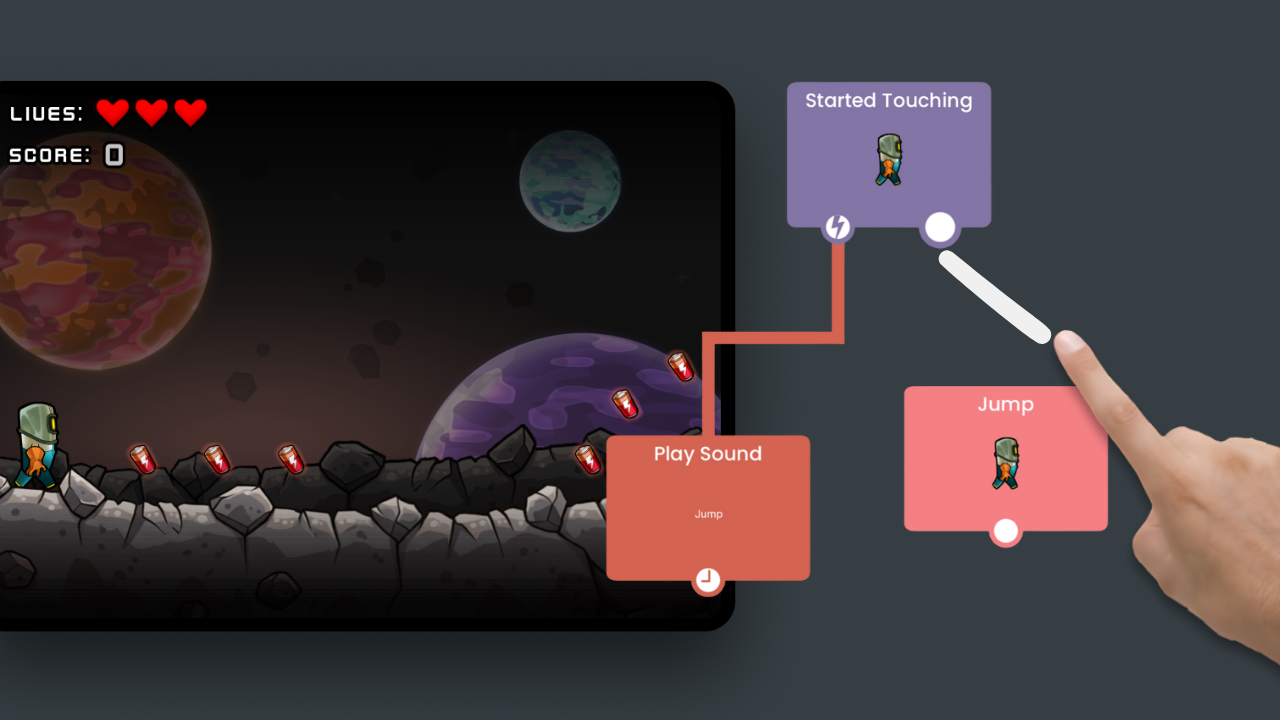
Incorporate touch controls without any code
Responsive Controls for Every Device
hyperPad’s touch controls automatically adapt to different iPad screen sizes and orientations, ensuring your game feels smooth and consistent on any device. You can create virtual joysticks, buttons, and interactive UI elements that scale correctly and remain responsive, giving players a seamless experience whether they’re on an iPad mini or a full-size Pro.

Interaction
Handles player input and touch-based controls to make your game respond to gestures and taps.

Object
Controls object properties, collisions, and interactions with other game elements.
Screen
Manages screen behavior, rotation, edge detection, zoom, and visual wrapping.
Transform
Changes the appearance, color, graphics, and movement states of objects.

UI
Updates and manipulates user interface elements like health bars, scores, and labels.

FX
Plays animations, sounds, and particle effects to enhance the game experience.

Scene
Controls scene-level actions, layers, music, and ad events.

Physics
Applies forces, attaches objects, and simulates real-world physics interactions.

Logic
Performs calculations, value manipulation, and conditional logic for gameplay.
.svg)
Custom
Enables advanced features like broadcasting messages, authentication, and reusable behavior bundles.
hyperPad’s touch controls let you create responsive, multi-touch interfaces with custom gestures for interactive gameplay. Adaptive UI elements ensure a seamless experience across all iPad screen sizes and orientations.
Learn More
Check out these resources to learn about our powerful touch-first game engine and start creating games.
.svg)