




.svg)

.svg)



Visual Building Without Code
Visual Scene Building is hyperPad's drag-and-drop interface for creating game worlds. Instead of writing code to position objects and define layouts, you work directly with visual elements on your iPad screen using intuitive touch gestures - just like arranging objects in real life.

The Core Concept
Think of it as the difference between describing a painting in words versus actually painting it. Traditional game development requires you to "describe" your game world through code. Visual Scene Building lets you paint it directly with your fingers.

Drag and drop objects directly onto your game canvas
See changes instantly as you build
Use natural touch gestures - pinch, zoom, rotate
Arrange elements spatially instead of mathematically
Layer, group, and organize scenes visually
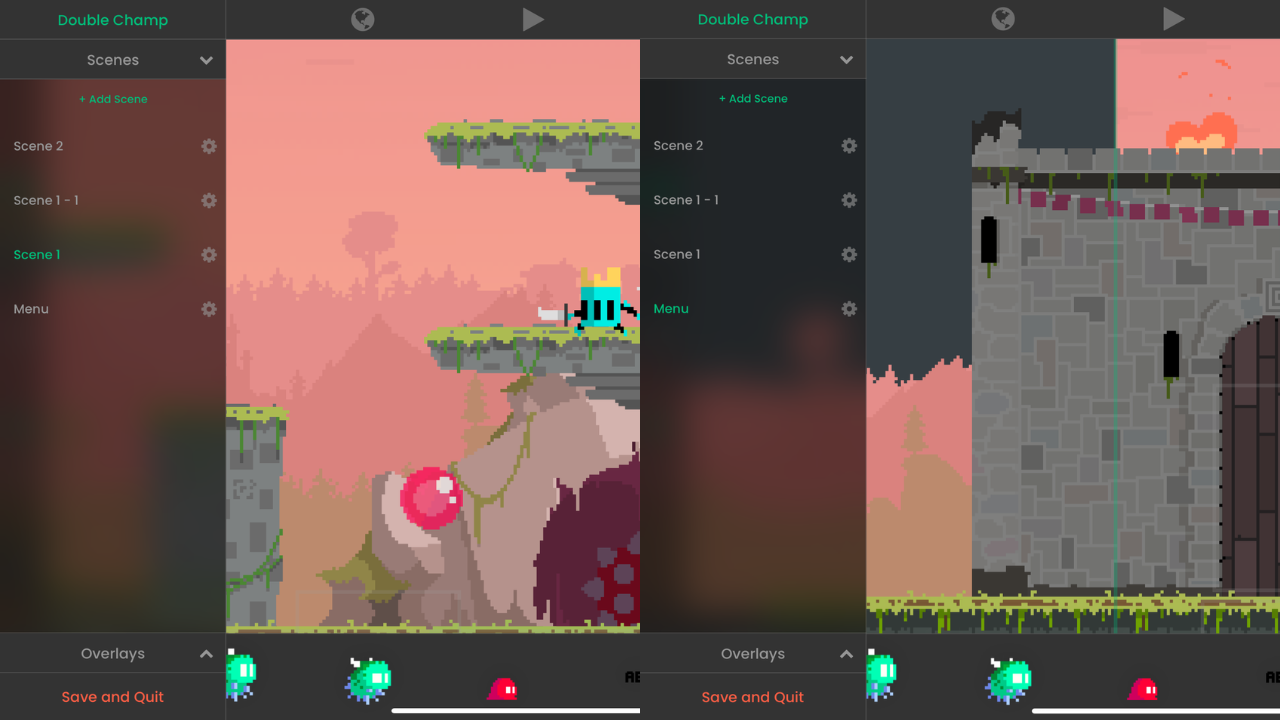
Build game worlds by arranging elements visually - no coding required
Why Visual Building Changes Everything
Game development has traditionally required coding knowledge to create even simple layouts. Visual Scene Building removes this barrier, making game creation accessible to artists, designers, educators, and anyone with a creative vision - regardless of technical background.

Interaction
Handles player input and touch-based controls to make your game respond to gestures and taps.

Object
Controls object properties, collisions, and interactions with other game elements.

Screen
Manages screen behavior, rotation, edge detection, zoom, and visual wrapping.

Transform
Changes the appearance, color, graphics, and movement states of objects.

UI
Updates and manipulates user interface elements like health bars, scores, and labels.

FX
Plays animations, sounds, and particle effects to enhance the game experience.

Scene
Controls scene-level actions, layers, music, and ad events.

Physics
Applies forces, attaches objects, and simulates real-world physics interactions.

Logic
Performs calculations, value manipulation, and conditional logic for gameplay.
.svg)
Custom
Enables advanced features like broadcasting messages, authentication, and reusable behavior bundles.
From placing objects and crafting environments to fine-tuning layouts and experimenting with designs in real time, every action in the Visual Scene Builder turns imagination into something tangible on your screen. Our visual creation tools continue to evolve, introducing new ways to design, organize, and build your worlds faster and more intuitively than ever—all right from your iPad.
Learn More
Ready to start building game worlds visually? Check out these resources to learn about the Visual Scene Builder and start creating.
.svg)